Best overall: QuickBooks Online. Best for bookkeeper collaboration: Xero. Best for approval workflows: Zoho Books. Best for solo catering invoicing: FreshBooks. For Florida restaurant owners choosing catering accounting software in 2026, start with the work you need to track: event deposits, final invoices, food purchases, and payroll records.
- QuickBooks Online is the best accounting software for catering businesses that need event-level reporting alongside restaurant books.
- Xero suits owners prioritizing shared bookkeeping; Zoho Books suits approval workflows; FreshBooks suits owner-led invoicing.
- Compare deposit handling, event costs, reconciliation, and bookkeeper access before choosing catering bookkeeping software.
- Discuss monthly bookkeeping with Full Plate separately from your software choice; confirm responsibilities before signing.
Why this matters for Florida catering operators
A restaurant catering a wedding has a different bookkeeping problem from a restaurant collecting payment at the counter. The deposit arrives before the event, food purchases happen before service, and the final payment follows a separate invoice. A bank balance alone does not explain that sequence.
Your software needs to connect those records without making you rebuild the story each month. You can handle that yourself when transactions remain manageable and you consistently reconcile the accounts. Professional help becomes useful when unresolved deposits, missing bills, or unfinished reconciliations keep carrying forward.
Full Plate belongs on the monthly bookkeeping shortlist for Florida restaurant owners who want help beyond catering accounting software. Ask what the engagement covers rather than assuming software setup, payroll, tax filing, and event reporting come together.
What makes the best accounting software for catering businesses?
Use these criteria to choose your 2026 shortlist before comparing individual features:
- Deposit handling: You need a clear record of money received before an event and how it applies to the final bill.
- Event profitability: Connect event revenue with food, rentals, outside labor, and other direct costs.
- Bank reconciliation: Match recorded activity to bank and card statements, not just downloaded transactions.
- Restaurant and catering separation: Keep catering results distinguishable from dining-room, takeout, or bar activity.
- Shared responsibility: Give your bookkeeper appropriate access while keeping payment approval under your control.
- Usable monthly reporting: Choose reports you can understand and maintain, not features nobody will keep updated.
The strongest choice is the system you and your bookkeeper can keep accurate every month. An event report loses its value when purchases never receive the right event assignment.
Catering accounting software at a glance
| Software | Best for | Standout capability | Key limitation |
|---|---|---|---|
| QuickBooks Online | Event reporting alongside restaurant books | Project profitability tools in eligible subscriptions | Event reports depend on consistent transaction coding |
| Xero | Shared work with a bookkeeper | Bank reconciliation and collaborative accounting | Detailed project tracking requires checking the subscription and setup |
| Zoho Books | Purchase and approval workflows | Configurable approvals and accounting automation | Workflow setup adds administration |
| FreshBooks | Solo operators managing client invoices | Client invoicing and expense tracking | Restaurant-wide reporting needs a careful fit check |
These are accounting systems, not substitutes for event scheduling or kitchen production planning. Check the current feature package before making your 2026 decision, especially where projects, approvals, or connected applications are involved.
1. QuickBooks Online: best for catering event profitability
QuickBooks Online combines invoicing, expense recording, bank reconciliation, and financial reporting. Its project tools, available in eligible subscriptions, make it a strong starting point when you need to connect event income and direct costs while keeping the wider restaurant books together.
Best for: Independent restaurant owners whose catering operation needs more detail than a separate sales category.
A Florida restaurant serving private events needs to distinguish profitable bookings from bookings that merely bring cash through the bank. Event-level reporting helps answer that question only when invoices, supplier bills, and other costs receive consistent assignments.
QuickBooks Online pros:
- Handles customer invoices and supplier bills within the same accounting system.
- Supports bank reconciliation alongside financial reporting.
- Offers project profitability tools in eligible subscriptions.
QuickBooks Online cons:
- Project reporting requires the right subscription and deliberate setup.
- Incomplete cost allocation produces incomplete event results.
Before committing, ask the person maintaining your books to demonstrate how a deposit, final invoice, and supplier bill connect to the same event. Do not accept a demonstration that stops at sending an invoice.
Verdict: Buy QuickBooks Online if event profitability and restaurant bookkeeping need to live together.
2. Xero: best for shared bookkeeping responsibilities
Xero provides invoicing, bill management, bank reconciliation, and accounting reports. It suits an owner who wants to remain involved while sharing ongoing bookkeeping with an outside professional.
Best for: Restaurant owners who want a clear division between their daily recordkeeping and a bookkeeper’s monthly work.
For example, you can retain responsibility for supplying event details and approving payments while a bookkeeper handles agreed reconciliation tasks. The software supports collaboration; the engagement agreement determines who actually does each job.
Xero pros:
- Brings invoices, bills, and bank reconciliation into one system.
- Supports shared access for owners and accounting professionals.
- Provides financial reports for reviewing the whole business.
Xero cons:
- Detailed event reporting requires checking project features and configuration.
- Shared access does not prevent gaps when responsibilities remain undefined.
Ask a prospective bookkeeper to show how they would identify an unmatched catering payment and return the question to you. That exchange matters more than a dashboard that looks complete but hides unresolved items.
Verdict: Buy Xero when shared bookkeeping is the priority and both parties agree on the workflow.
3. Zoho Books: best for purchase and approval workflows
Zoho Books covers invoicing, expenses, bank reconciliation, and financial reporting, with approval and automation capabilities that depend on the subscription. It deserves consideration when the recurring problem is controlling how bills enter the books and receive approval.
Best for: Catering operators who need a more deliberate process between receiving a supplier bill and authorizing payment.
A catering event can involve food suppliers, equipment rentals, and outside services. Your system should keep the bill, its event assignment, and its approval status understandable without relying on someone’s memory.
Zoho Books pros:
- Combines customer billing and supplier records.
- Offers configurable approval workflows in eligible subscriptions.
- Supports automation for repeatable accounting tasks.
Zoho Books cons:
- Approval rules require setup and ongoing ownership.
- A poorly designed workflow adds steps without improving the records.
Demonstrate the process with an actual supplier bill before choosing. Identify who submits it, who checks its event assignment, and who approves payment. Keep the workflow simple enough for a busy service week.
Verdict: Buy Zoho Books when approval discipline is the main problem you need to solve.
4. FreshBooks: best for solo catering invoicing
FreshBooks focuses on client invoicing, expense tracking, and accounting tools. It is a practical candidate when the owner manages customer billing directly and wants a straightforward starting point for service-based catering work.
Best for: Solo catering operators whose immediate priority is issuing invoices and keeping related expenses organized.
For a restaurant with substantial dining-room activity, payroll records, and separate catering reporting needs, evaluate the complete accounting workflow before choosing. A convenient invoice screen is not enough to establish that fit.
FreshBooks pros:
- Supports customer invoicing and payment records.
- Keeps business expenses alongside client billing activity.
- Includes accounting reports rather than functioning only as an invoice template.
FreshBooks cons:
- Restaurant-wide reporting requirements need a detailed demonstration.
- Feature access depends on the subscription selected.
Ask your intended bookkeeper whether FreshBooks supports the records and reports they need. Choosing software first and discussing the handoff later creates avoidable rework.
Verdict: Buy FreshBooks for owner-led catering invoicing; hold if broader restaurant accounting remains unresolved.
How the ranking works
The 2026 ranking prioritizes event profitability, reconciliation, collaboration, and manageable monthly work. QuickBooks Online is the default because project reporting addresses a central catering question: what remained after an event’s direct costs?
Xero, Zoho Books, and FreshBooks each fill a different slot. Move them ahead of the default only when collaboration, approvals, or solo invoicing is the problem that matters most to your operation. This is a workflow comparison, not a claim of hands-on product testing.
Run a real event through the proposed system
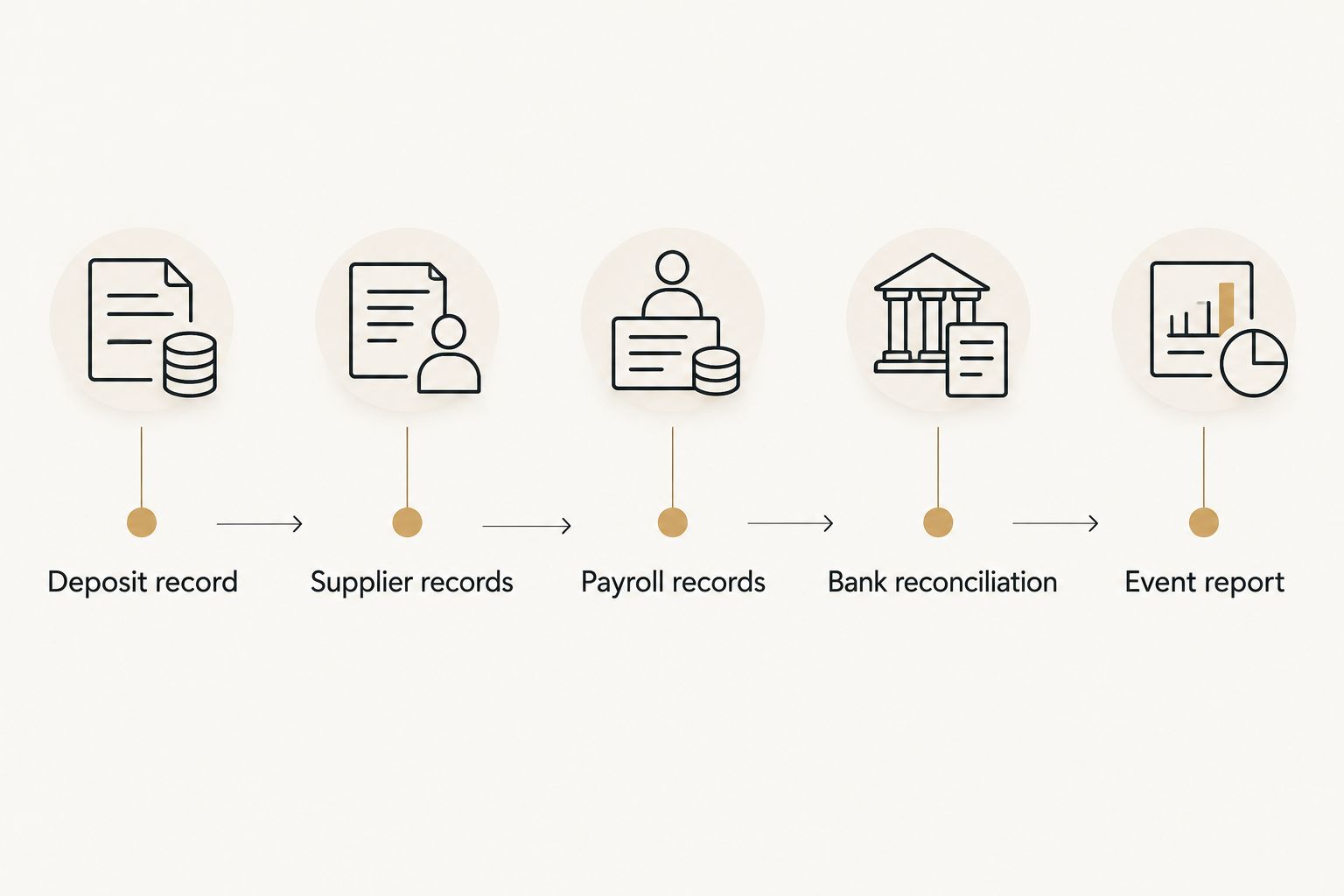
Before switching software, review 1 completed event from booking through final payment. Use actual records rather than a vendor’s sample company, and check these steps:
- Deposit record: Identify the customer, event, amount received, and outstanding balance.
- Supplier records: Connect food purchases, rentals, and outside services to the event.
- Payroll records: Decide how relevant labor information reaches the books and who checks it.
- Bank reconciliation: Confirm that recorded receipts and payments match the statements.
- Event report: Review revenue and assigned direct costs, then identify what remains outside that report.
Your bookkeeper should explain the treatment of advance payments rather than automatically recording every deposit as completed-event revenue. Payment timing and event timing are different facts.
Compare the result with 2 consecutive months of your existing books. This is a recommended selection exercise, not a performance benchmark: it shows whether the proposed setup makes your own records easier to explain.
Automate bill handling after approval rules are clear
Supplier bills are a sensible place to reduce repetitive entry, but automated capture does not establish whether a purchase belongs to a particular event. Someone still needs to check the supplier, the supporting document, and the assignment.
The control question behind accounts payable automation is who reviews a captured bill before payment is authorized. Faster processing does not replace that decision, especially when a rental invoice or food delivery covers several bookings.
Before enabling an automated workflow in your 2026 setup, name the person responsible for checking duplicates and exceptions. Keep payment approval separate from the task of entering bills when your staffing allows it.
Automate a defined process, not an unresolved responsibility. If you cannot explain the approval route on paper, configuring software will not settle it.
What you handle yourself, and what to discuss outsourcing
DIY bookkeeping remains a valid choice when you reliably maintain invoices, retain purchase records, and finish reconciliations. You know which customer changed the guest count and which supplier delivered an extra order. That operational knowledge remains necessary after outsourcing.
Professional help becomes useful when those details never reach the books or reports repeatedly arrive unfinished. Full Plate should be part of a conversation about who takes responsibility for each monthly task, not a promise that buying software removes your involvement.
Use 3 source records for an initial discussion: a bank statement, an event invoice, and a supplier bill. Ask the prospective bookkeeper to explain the handoff and the questions they would return to you.
For a mixed dining-room and catering business, define the reporting split before signing. The guide to restaurant accounting services for restaurants with catering sales addresses that service-selection question separately from software selection.
Which catering accounting software should you choose?
Choose QuickBooks Online as the default shortlist leader for 2026 when event reporting and restaurant books belong together. Choose Xero for shared bookkeeping, Zoho Books for approval workflows, or FreshBooks for solo invoicing after confirming the wider accounting fit.
If you are considering Full Plate, bring the software shortlist into the engagement discussion. Confirm who handles setup, recurring bookkeeping, unresolved transactions, and reporting; do not assume those responsibilities from a product name.
FAQ
What's the best accounting software for catering businesses in Florida?
QuickBooks Online is the default shortlist leader when you need event profitability alongside restaurant bookkeeping. Confirm that the selected subscription includes the project tools your workflow requires.
Is Xero better than QuickBooks Online for a catering business?
Xero is the better fit when shared bookkeeping is your main selection priority; QuickBooks Online leads this shortlist for event profitability. Have your intended bookkeeper demonstrate the same completed event in either system.
Can I do my catering bookkeeping myself?
Yes, you can maintain catering books yourself if you consistently record activity, retain supporting records, and reconcile accounts. Outside help becomes useful when those tasks remain unfinished or the reports do not explain your results.
Should I record a catering deposit as sales immediately?
Do not automatically treat every advance deposit as completed-event revenue. Ask your accounting professional how the payment should be recorded under your accounting method and applied when the event takes place.
Does catering accounting software replace a bookkeeper?
No, software records and organizes activity but does not decide every accounting treatment or resolve missing information. Someone must own reconciliation, transaction review, and follow-up questions.
Do I need separate software for restaurant and catering sales?
Not necessarily; one accounting system can hold both activities if the setup distinguishes them clearly. Confirm that you can review catering results without losing the whole-business picture.
What should I ask before hiring a monthly bookkeeper?
Ask who handles reconciliations, deposit tracking, event cost assignments, and monthly reporting. Also confirm what records you provide, who approves payments, and which services fall outside the engagement.
One last thing
The most revealing software demonstration starts with a changed event, not a perfect invoice. Ask how the system handles a reduced guest count after a deposit, a revised final bill, and supplier costs already incurred. Choose the workflow that leaves a clear record of what changed and why.