Best overall for counter-service sales-tax tracking: Square. Best for table-service operations: Toast. Best for monthly bookkeeping review: QuickBooks Online. Best for owner-managed tracking: Google Sheets. For Florida restaurants in 2026, the right choice depends on whether you need to capture tax at checkout, reconcile it in your books, or organize records for filing.
- Square and Toast belong on a shortlist of the best apps for restaurant sales tax at checkout.
- QuickBooks Online supports bookkeeping review; Google Sheets suits owners comfortable maintaining their own tracking process.
- Florida restaurant sales-tax tracking must separate taxable sales, tax collected, refunds, and delivery-platform activity.
- Ask Full Plate to define monthly bookkeeping responsibilities separately from sales-tax return preparation and filing.
Why this matters for Florida restaurant owners
A Florida restaurant can collect tax correctly at the register and still have bookkeeping that does not explain the amount owed. Refunds, delivery settlements, deposits, and adjustments all need a place in the records.
The best app is the one whose tax totals you can trace back to actual restaurant transactions. A dashboard total is not enough when your sales report, bank deposit, and bookkeeping report disagree.
For owners considering Full Plate, the useful question is not simply which app to buy. Ask who will review the records each month, resolve differences, and handle any agreed filing responsibilities.
What makes the best restaurant sales-tax tracking app?
Use these criteria before comparing names. Your restaurant's existing setup matters more than a long feature list.
- Transaction detail: You need to identify taxable sales, tax collected, refunds, and adjustments rather than relying on deposits alone.
- Florida setup: Check the applicable state tax and county discretionary sales surtax against Florida Department of Revenue guidance.
- Reconciliation: Reports should support a comparison between sales activity, payment settlements, and the tax liability in your books.
- Delivery separation: Keep restaurant sales distinct from transactions for which a marketplace provider collects and remits tax.
- Record access: Your owner and bookkeeper need usable reports, appropriate permissions, and a way to retain supporting records.
- Responsibility clarity: Tracking, preparing a return, submitting it, and authorizing payment are separate tasks. Assign each one explicitly.
For your 2026 review, start with your existing POS and accounting setup. Switching applications before identifying the actual problem adds another system without necessarily fixing the records.
Restaurant sales-tax apps at a glance
These options serve different parts of the process. They are not interchangeable, and this ranking does not treat bookkeeping software as a substitute for a restaurant register.
| Option | Best for | Standout capability | Key limitation |
|---|---|---|---|
| Square | Counter-service checkout tracking | POS sales and tax reporting | Register reports still need reconciliation with settlements and books |
| Toast | Table-service restaurant workflows | Restaurant-focused POS reporting | Restaurant workflow features do not establish who handles tax filing |
| QuickBooks Online | Monthly bookkeeping review | Recording and reviewing sales-tax liabilities | Imported activity needs a defined posting method to prevent duplication |
| Google Sheets | Owner-managed tax schedules | Flexible, visible calculations and supporting schedules | Manual entry and formulas require ongoing checks |
Choose the transaction system first and the review process second. A POS captures sales; bookkeeping explains how those sales flow into deposits and liabilities.
1. Square: best restaurant sales-tax app for counter service
Square combines checkout activity with sales and tax reporting. It belongs on the shortlist for a Florida counter-service restaurant that wants to trace collected tax back to register transactions.
The practical test is a normal business day with exceptions. Review how the proposed setup handles dine-in sales, takeout, refunds, discounts, and any separate delivery activity before relying on its totals.
Square pros
- Sales and tax reporting sit alongside the transactions recorded through the POS.
- Transaction detail gives you a starting point for investigating an unexpected tax total.
- A consistent register process gives an owner or bookkeeper repeatable source records.
Square cons
- Incorrect tax settings produce incorrect collection, regardless of how readable the reports are.
- Net payment deposits are not a substitute for reviewing gross sales and tax separately.
- Separate delivery channels still need their own reconciliation process.
Best for: Counter-service owners choosing or already using Square as their main register.
Ask for a demonstration using your actual sales categories, not a generic retail checkout. Confirm that the reports you need are included in the configuration under consideration.
Verdict: Buy for counter-service checkout needs; skip a switch made solely to avoid monthly reconciliation.
2. Toast: best restaurant sales-tax app for table service
Toast is a restaurant POS with sales and tax reporting. Its place on this list is table-service operations where tax tracking needs to fit the same transaction workflow as checks, payments, and adjustments.
For a Florida dining room, demonstrate a refunded check, a discounted meal, and a transaction containing a service charge. Ask the provider to explain both the setup and the reports; do not assume a payment label determines its tax treatment.
Toast pros
- Restaurant-focused transaction records provide a starting point for sales-tax review.
- Sales reporting helps owners examine activity before comparing it with deposits.
- Keeping checkout records in the operating POS reduces reliance on a separate manual sales log.
Toast cons
- A restaurant-focused system still requires correct tax configuration.
- Reporting does not resolve the tax treatment of an incorrectly classified transaction.
- Choosing Toast does not, by itself, assign responsibility for preparing or filing returns.
Best for: Table-service owners evaluating a restaurant POS as part of their broader operating setup.
If Toast already captures your sales accurately, first investigate the handoff to your books. A reporting or posting problem is not automatically a reason to replace the register.
Verdict: Buy when Toast fits the dining-room workflow; hold if your only unresolved issue is bookkeeping review.
3. QuickBooks Online: best for monthly sales-tax bookkeeping
QuickBooks Online is accounting software, not a restaurant POS replacement. Its role is to help you maintain the books and review recorded sales-tax liabilities alongside other business activity.
For a Florida restaurant in 2026, the key decision is how POS information enters the ledger. Detailed imports and summarized entries need different procedures, but either approach needs a clear rule against recording the same sales twice.
QuickBooks Online pros
- Sales-tax liabilities can be reviewed within the broader bookkeeping records.
- Bank reconciliation helps distinguish recorded activity from actual cash movements.
- A consistent posting method supports a repeatable monthly review.
QuickBooks Online cons
- Accounting software cannot correct inaccurate source reports without investigation.
- Combining bank-feed entries with imported sales can duplicate revenue if handled incorrectly.
- A balance in the ledger does not prove the return is complete or submitted.
Best for: Owners whose register works but who need a clearer monthly accounting process.
Before adding a connector, write down what it should post and how you will check it. Compare that plan with what monthly restaurant bookkeeping should include.
Verdict: Buy for the accounting workflow; skip the assumption that connecting software finishes the tax review.
4. Google Sheets: best for owner-managed tracking schedules
Google Sheets lets you build a tax-tracking schedule from your POS reports and other source records. It is a reasonable DIY option when you understand the transactions and consistently maintain the file.
Keep the original reports outside the spreadsheet as supporting records. The sheet should explain the source totals, not become the only evidence that the sales occurred.
Google Sheets pros
- You can arrange columns around your restaurant's actual sales channels.
- Visible formulas make the calculation method available for review.
- A well-labeled schedule helps document questions for a bookkeeper or tax preparer.
Google Sheets cons
- Manual entry creates opportunities for omissions and transcription errors.
- Formula changes can alter results without changing the underlying source records.
- The owner must maintain the process rather than expecting the spreadsheet to collect transactions automatically.
Best for: Owners comfortable reviewing source reports and maintaining a repeatable tracking schedule.
Use separate columns for sales, tax, refunds, and explanations of adjustments. Avoid a single running total that leaves you unable to explain a difference later.
Verdict: Hold onto Google Sheets while your process stays accurate and current; skip it when unresolved differences keep accumulating.
Florida checks to make before trusting any app
Florida Department of Revenue sales-and-use-tax guidance identifies a 6% state sales-tax rate, with applicable discretionary sales surtax added according to the relevant rules. Do not set a restaurant's total rate from the state percentage alone.
The department's general filing guidance makes returns due on the 1st day and delinquent after the 20th day of the month following the reporting period. Weekend and holiday rules affect deadlines; confirm your assigned filing frequency and current calendar directly with the department for 2026.
Those rules explain why software selection cannot stop at a tax-rate field. Your process also needs to address:
- Location: Confirm the applicable jurisdiction rather than copying another restaurant's settings.
- Transaction treatment: Check how discounts, refunds, service charges, and other adjustments affect taxable sales.
- Delivery records: Identify which party collected and remitted tax for each channel.
- Filing ownership: Establish who prepares, reviews, submits, and pays.
Use current Florida Department of Revenue guidance for the tax decision. Use your app to preserve the records supporting that decision.
A monthly process that works with any of these options
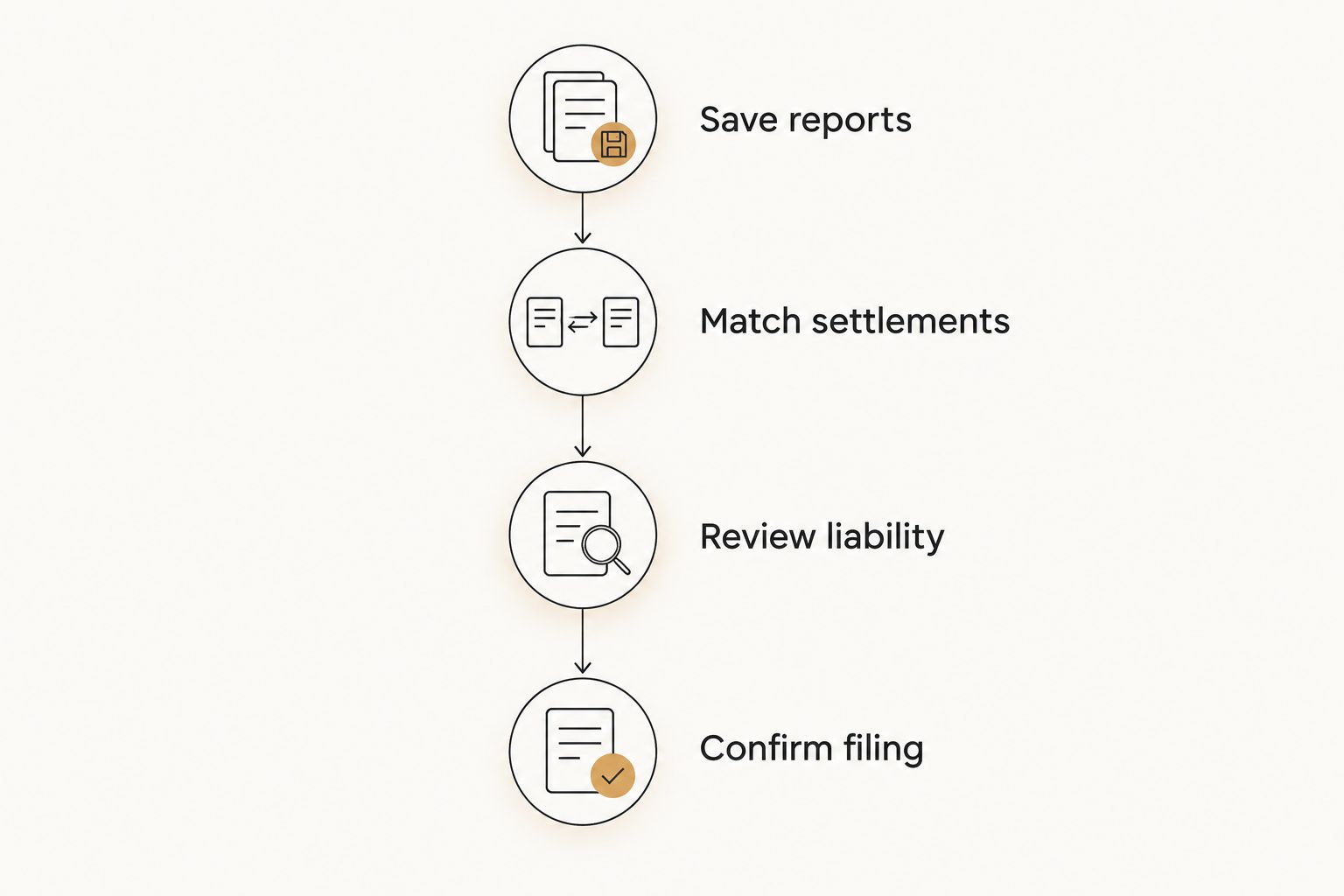
The best apps for restaurant sales tax still need a review routine. For a 2026 setup, define the following handoff before the first reporting period closes.
Save reports
Retain POS tax reports, sales summaries, delivery statements, refund records, and settlement detail for the same period. Consistent dates make comparisons meaningful.
Match settlements
Compare sales activity with payment settlements and bank deposits. Explain differences such as processing fees and timing rather than forcing sales to equal cash received.
Review liability
Compare tax collected, adjustments, recorded payments, and the remaining sales-tax liability. Investigate unexplained differences before using the balance to prepare a return.
Confirm filing
Name the person responsible for the return and payment. Retain submission and payment confirmations with the supporting records.
When DIY works, and when monthly help becomes useful
DIY bookkeeping remains a valid choice when you can explain the totals, keep records current, and meet your filing responsibilities. You do not need to outsource simply because your restaurant uses several applications.
Professional help becomes useful when differences remain unresolved or the monthly review repeatedly slips. A Florida restaurant with seasonal changes, catering activity, or several delivery channels needs a process that accounts for those records without losing track of who owns the work.
Full Plate is a bookkeeping-service consideration for Florida restaurant owners seeking ongoing help, not another sales-tax app. Ask Full Plate to specify which reconciliations, reports, tax-related tasks, and owner approvals a proposed engagement includes.
Keep the limits visible. Monthly bookkeeping is not the same as return preparation, and return preparation is not the same as authorization to release a payment.
How these options were ranked
This ranking prioritizes transaction records, reconciliation, Florida setup checks, and clear ownership of the work. It assigns each option a distinct job rather than claiming one application replaces every part of restaurant bookkeeping.
Square takes the counter-service slot; Toast takes table service. QuickBooks Online supports the accounting review, while Google Sheets fits owners maintaining their own schedules. These are workflow recommendations, not results from a comparative product test.
Which restaurant sales-tax app should you choose?
For an undecided counter-service owner, start by evaluating Square against your actual checkout requirements. For table service, evaluate Toast's restaurant workflow. If your POS already works, focus on QuickBooks Online or a disciplined tracking schedule rather than replacing it.
For a 2026 hiring decision, ask Full Plate to explain the handoff between your register, monthly books, and tax filing. Choose the arrangement that leaves every task with a named owner.
FAQ
What's the best app for tracking restaurant sales tax in Florida?
Square is the default shortlist choice for counter-service checkout tracking, while Toast fits a table-service POS evaluation. QuickBooks Online serves the monthly accounting review rather than replacing the register.
Can I track my restaurant's sales tax in Google Sheets?
Yes, Google Sheets can hold an owner-maintained tracking schedule supported by POS reports and other records. You remain responsible for accurate entries, checked formulas, and filing.
Does my restaurant POS file Florida sales-tax returns?
Do not assume that POS tax reporting includes return filing. Confirm the exact service scope and identify who prepares, reviews, submits, and pays each return.
Is Florida restaurant sales tax always 6%?
No. Florida's state sales-tax rate is 6%, but applicable discretionary sales surtax also needs to be considered. Check the relevant jurisdiction and transaction treatment with Florida Department of Revenue guidance.
Do delivery deposits tell me how much sales tax I owe?
No, a delivery deposit alone does not establish your restaurant's sales-tax liability. Review the underlying sales, adjustments, fees, and records showing which party collected and remitted tax.
Should I hire a bookkeeper if I already have restaurant software?
Hire bookkeeping help when you need someone to maintain and review the records, not merely because you own software. Ask Full Plate to define the proposed monthly work and any separate tax-filing responsibilities before hiring.
One last thing
Before changing apps, choose a completed reporting period and trace its tax total from the POS through the books to the filed return. If you cannot explain the differences, fix the handoff before replacing the software. That exercise gives you a concrete requirement to bring to any provider.