Best overall: QuickBooks Online for an independent Florida bar. Best for owner–bookkeeper collaboration: Xero. Best for food-led operations: Restaurant365. Best for brewery production: Ekos, paired with an accounting system. This 2026 guide compares the software choices and explains when to keep doing the books yourself or discuss monthly bookkeeping with Full Plate.
- QuickBooks Online is the best accounting software for bars and breweries needing a general-purpose accounting starting point.
- Xero suits owners who want shared access with their bookkeeper; Restaurant365 suits food-led restaurant operations.
- Ekos addresses brewery production and inventory; distinguish those jobs from financial accounting.
- Choose monthly bookkeeping responsibilities before changing software, especially when deposits, tips, and inventory no longer reconcile.
Why this matters for Florida owners
A Florida neighborhood bar and a brewery selling packaged beer need different records. Both need accurate books, but the brewery also needs to track what happens between ingredients, production, finished beer, and sales.
The best software choice starts with the work your business needs, not the longest feature list. Before changing systems in 2026, separate financial accounting from restaurant operations and brewery production. Then decide which tasks you will keep and which tasks a monthly bookkeeper should own.
Full Plate belongs in the bookkeeping conversation, not the software ranking. Ask about the proposed monthly scope, responsibilities, and compatibility with your existing systems before making a software commitment.
What makes the best accounting software for bars and breweries?
Use these criteria to judge the shortlist before arranging demonstrations:
- Deposit reconciliation: You need to explain the difference between recorded sales and bank deposits, including fees, tips, refunds, and settlement timing.
- Useful reporting: Financial reports should distinguish meaningful activities, such as food, beverage, taproom, and wholesale sales where applicable.
- Inventory fit: A bar needs purchasing and stock records. A producing brewery also needs production records; these are not interchangeable requirements.
- Bookkeeper access: Your owner, bookkeeper, and tax preparer need appropriate access without sharing a single login.
- Monthly workload: Identify who reviews imported transactions, investigates differences, and closes the books. An integration does not assign responsibility.
For a 2026 purchase, ask vendors to demonstrate your actual workflow using sample records. A polished dashboard does not establish whether the system handles your deposits correctly.
Accounting software at a glance
These are use-case recommendations, not a claim that every business needs a new system. Keep working software when it supports reliable records and your bookkeeper can maintain it.
| Software | Best for | Standout capability | Key limitation |
|---|---|---|---|
| QuickBooks Online | Independent bars needing general accounting | Financial accounting with bank reconciliation and reporting | Brewery production needs separate consideration |
| Xero | Owners prioritizing bookkeeper collaboration | Shared online accounting and reconciliation | Restaurant workflows depend on configuration and connected systems |
| Restaurant365 | Food-led bars needing restaurant operations alongside accounting | Restaurant-focused accounting and operational tools | Broader scope creates more implementation work |
| Ekos | Breweries managing production and finished inventory | Brewery production and inventory management | Not a like-for-like replacement for general accounting software |
The distinction matters: Restaurant365 connects restaurant operations with accounting; Ekos addresses brewery operations. Evaluate each against its intended job rather than treating both as interchangeable ledger choices.
1. QuickBooks Online: best accounting software for independent bars
QuickBooks Online handles general business accounting, including bank reconciliation and financial reporting. For an independent Florida bar, it is a sensible default when your main need is dependable monthly books rather than production management.
Start with your existing sales and deposit records. Ask the prospective bookkeeper to explain how those records would reach QuickBooks Online and how differences would be resolved.
QuickBooks Online pros:
- Provides a general accounting foundation for recording income, expenses, assets, and liabilities.
- Supports bank reconciliation rather than relying solely on the transaction feed.
- Produces financial reports for reviewing the business with your bookkeeper or tax preparer.
QuickBooks Online cons:
- General accounting does not replace brewery batch and production records.
- Imported transactions still need review; software does not decide whether your sales entries duplicate deposits.
Best for: An independent bar whose priority is an understandable monthly close, with separate systems handling sales and payroll as needed.
When QuickBooks Online fits DIY bookkeeping
You can keep doing the books when you consistently reconcile accounts, retain supporting records, and understand the reports. That is a legitimate choice, not a temporary failure to outsource.
Professional help becomes useful when unresolved transactions carry into later months or bookkeeping repeatedly loses its place behind staffing and service. Ask Full Plate whether keeping QuickBooks Online would support the proposed bookkeeping scope before considering a migration.
Verdict: Buy QuickBooks Online for general bar accounting; skip a software switch if your current setup already works.
2. Xero: best accounting software for owner–bookkeeper collaboration
Xero is an online accounting system with bank reconciliation and financial reporting. It belongs on the shortlist when you want the owner and bookkeeper working from shared accounting records rather than exchanging separate files.
Choose it around the working relationship, not a dashboard preference. Your prospective bookkeeper should demonstrate how questions, supporting documents, and unresolved transactions will be handled.
Xero pros:
- Supports shared access to online accounting records.
- Includes bank reconciliation and core financial reporting.
- Separates the accounting system from your choice of restaurant operating tools.
Xero cons:
- General accounting features do not establish that a particular POS connection handles your sales correctly.
- Brewery production still requires a separate operational workflow.
Best for: An owner who wants a collaborative monthly bookkeeping process and a bookkeeper comfortable maintaining Xero.
What to check before choosing Xero
Use a sample month containing refunds, card fees, and deposits that arrive after the sale date. Ask how each item appears in the accounts. Then ask who investigates a mismatch.
For your 2026 decision, prioritize a clear answer over a long integration directory. A listed connection is only part of the workflow; review and reconciliation still need an assigned owner.
Verdict: Buy Xero when it fits the agreed bookkeeping process; hold if the sales-to-bank workflow remains unclear.
3. Restaurant365: best accounting software for food-led bars
Restaurant365 combines restaurant accounting with operational tools, including inventory-related workflows. It deserves consideration when your Florida bar also runs a substantial kitchen and you need purchasing, food costs, and accounting considered together.
The reason to evaluate Restaurant365 is the restaurant operating workload. Do not adopt a broader system merely because your current books are behind.
Restaurant365 pros:
- Organizes accounting around restaurant operations rather than only general business transactions.
- Brings restaurant inventory and accounting into the same product family.
- Gives food-led businesses a restaurant-specific alternative to a general ledger plus separate operating tools.
Restaurant365 cons:
- A broader system requires decisions about setup, data entry, and staff responsibilities.
- Restaurant inventory tools should not be assumed to cover brewery production requirements.
Best for: A food-led bar where purchasing and inventory workflows justify a restaurant-focused accounting platform.
Make the implementation decision explicit
Ask who maintains item records, checks supplier invoices, and reviews inventory differences. If nobody owns those tasks, changing platforms leaves the underlying gap intact.
A smaller bar with straightforward bookkeeping should compare that implementation work against keeping its existing ledger. More connected functions are useful only when your team maintains the records those functions need.
Verdict: Buy Restaurant365 for a defined restaurant-operations need; skip it as a substitute for catching up unfinished books.
4. Ekos: best brewery software for production and inventory
Ekos focuses on beverage production and inventory management. For a Florida brewery, it belongs in the discussion when ingredient use, production activity, and finished beer require records beyond the financial ledger.
Treat Ekos as an operational choice that must work with your accounting process. Do not compare it with QuickBooks Online solely on the basis that both contain financial information.
Ekos pros:
- Addresses brewery production workflows rather than only recording financial transactions.
- Tracks inventory through beverage operations.
- Gives the brewery team a production-focused system to evaluate alongside its accounting requirements.
Ekos cons:
- Production records do not eliminate bank reconciliation or the monthly accounting close.
- Connections with accounting require a clear mapping of what moves between systems and who checks it.
Best for: A producing brewery that needs operational records for ingredients, production, and finished inventory.
Separate taproom sales from production records
A taproom sale, a wholesale invoice, and a movement of finished beer answer different questions. Ask the vendor to demonstrate those distinctions using your business model.
Before committing in 2026, ask your bookkeeper how production-related information will reach the financial accounts. Confirm responsibility for reviewing inventory balances and correcting differences, rather than assuming a connection settles everything.
Verdict: Buy Ekos for a demonstrated brewery-production need; skip it as a standalone answer to unfinished accounting.
Keep DIY bookkeeping or hire monthly help?
Keep DIY bookkeeping when you can maintain the records and explain the balances. Outsourcing becomes useful when the recurring accounting work competes with running the restaurant or leaves questions unresolved.
| Approach | Best for | Main advantage | Main limitation |
|---|---|---|---|
| Owner-managed books | Owners with a repeatable process and time to maintain it | Direct involvement in every accounting decision | The work still needs protected time |
| Monthly bookkeeping service | Owners ready to delegate recurring accounting tasks | Defined responsibility for agreed monthly work | Requires a clear scope and timely owner responses |
When discussing monthly bookkeeping with Full Plate, establish these responsibilities before signing:
- Owner records: Who supplies POS summaries, invoices, payroll reports, and explanations of unusual transactions?
- Monthly reconciliation: Who matches accounts to statements and resolves differences?
- Report review: Who explains the completed reports and raises outstanding questions?
Full Plate is a bookkeeping-service option for Florida restaurant owners considering ongoing monthly help. Assess the fit through the proposed scope, not an assumption that software management, payroll, tax filing, and inventory work are all included.
Read what monthly restaurant bookkeeping services should include before comparing proposals. Require each provider to identify both included work and owner responsibilities.
A practical software selection process
Use this sequence to turn demonstrations into a decision. Set a 30-day review window for your own selection process rather than letting software research displace the bookkeeping work.
- Gather records. Assemble 2 months of statements, sales summaries, payroll reports, and relevant inventory records. Include a month with unusual activity if one exists.
- Map deposits. Show how recorded sales become bank deposits. Identify fees, refunds, tips, and timing differences without treating every deposit as new revenue.
- Test reports. Request 3 reports: a profit and loss statement, a balance sheet, and a reconciliation report. Ask what supporting information explains each balance.
- Assign ownership. Write down who supplies records, reviews transactions, resolves questions, and approves corrections.
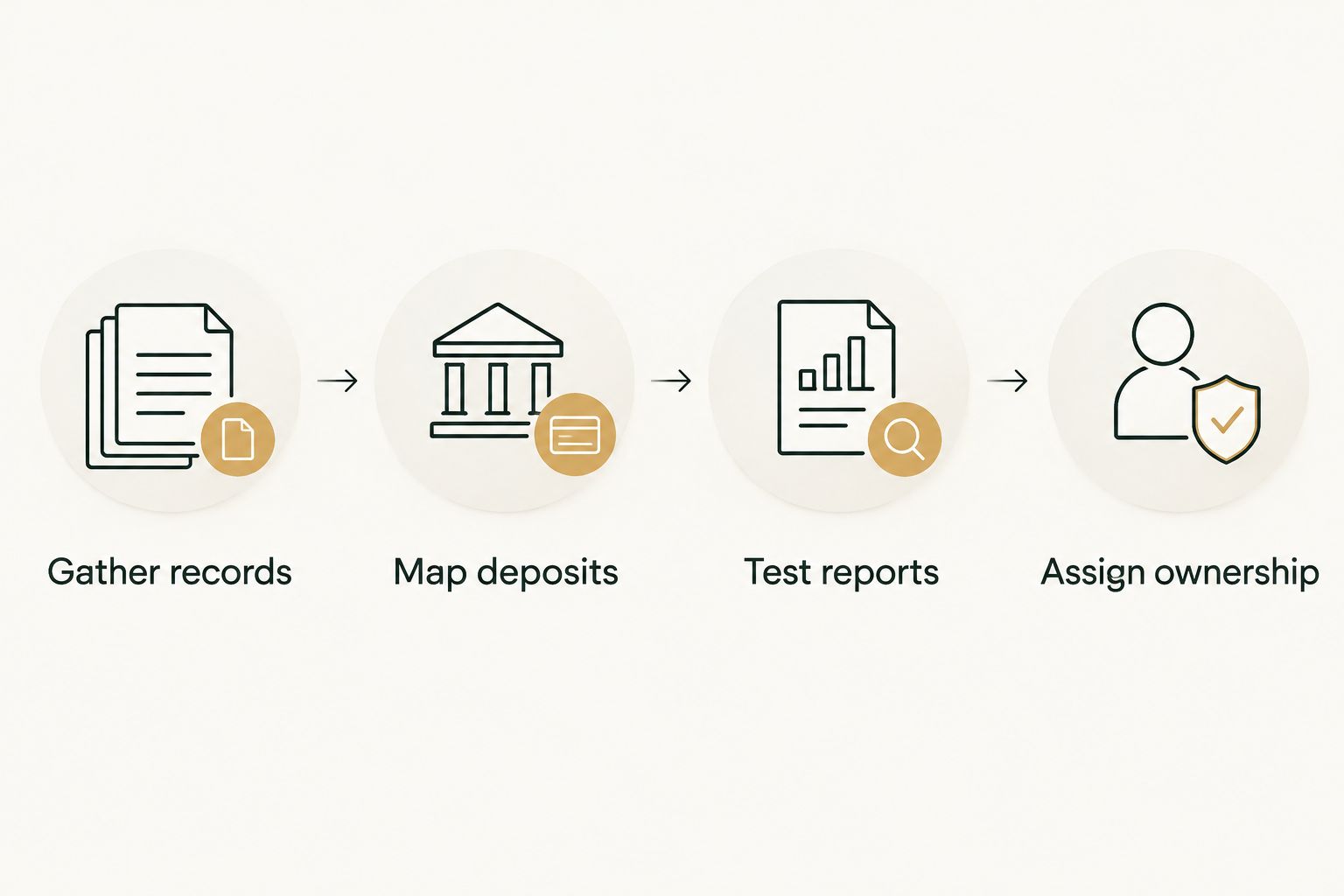
Use the same records for every demonstration. That makes the comparison about your bar or brewery rather than whichever vendor gives the most polished presentation.
How this shortlist is ranked
This 2026 shortlist ranks software by its intended job: general accounting, shared bookkeeping, restaurant operations, or brewery production. The criteria are reconciliation, reporting, inventory fit, access, and recurring workload—not unsupported claims about speed or savings.
The default recommendation favors a general accounting system for an independent bar. Specialized operating needs justify a different choice; an unfinished monthly close alone does not.
Which accounting software should you choose?
Choose QuickBooks Online as the starting point for an independent Florida bar needing general accounting. Choose Xero when the shared bookkeeping workflow fits better, Restaurant365 when restaurant operations justify the broader setup, and Ekos when brewery production needs its own system.
If you already use suitable software, decide whether to hire monthly help before replacing it. Changing who maintains the books and changing the software are separate decisions.
FAQ
What's the best accounting software for bars and breweries in Florida?
QuickBooks Online is the starting recommendation for an independent bar needing general accounting. A producing brewery should also evaluate whether it needs production software such as Ekos alongside its accounting system.
Is QuickBooks Online or Xero better for a small bar?
Choose between QuickBooks Online and Xero based on the bookkeeping workflow your owner and bookkeeper can maintain. Demonstrate sales entry, deposit reconciliation, document handling, and monthly reporting before deciding.
Does a brewery need different software from a bar?
A producing brewery needs production and inventory records beyond ordinary bar bookkeeping. Distinguish those operational requirements from the general accounting work needed to reconcile accounts and prepare financial reports.
Can I keep doing my bar's bookkeeping myself?
Yes, you can keep doing the books if you maintain supporting records, reconcile accounts, and understand the balances. Consider monthly help when unresolved work accumulates or you cannot protect time for the process.
Does accounting software handle Florida tax compliance automatically?
Do not treat accounting software as confirmation of Florida tax compliance. Identify your applicable obligations and confirm who reviews the records, prepares returns, and handles filing responsibilities.
Should I change software before hiring a restaurant bookkeeper?
Choose the bookkeeping scope before committing to a software change. A prospective bookkeeper should assess whether your existing system can support the agreed work and identify any specific reason to replace it.
What should I ask Full Plate before hiring monthly bookkeeping help?
Ask Full Plate to define monthly deliverables, supported software, owner responsibilities, and the treatment of existing bookkeeping problems. Confirm separately whether payroll, tax filing, inventory work, and historical corrections belong in the proposed scope.
One last thing
A bank deposit is not the same thing as a day's sales. Fees, refunds, tips, and settlement timing can separate the two, so a successful bank connection is not proof that your books are correct.
Before choosing software, ask someone to explain a sample deposit from sale to statement. That answer tells you more about the proposed bookkeeping process than a dashboard screenshot.