Best first demo for Toast users: Toast Payroll. Best accounting-led shortlist: QuickBooks Payroll. Best owner-managed shortlist: Gusto. Best service-led shortlist: RUN Powered by ADP. For Florida restaurants in 2026, choose by how payroll handles your actual shifts, tips, approvals, and monthly books—not by the longest feature list.
- The best payroll software for restaurants must fit your time records, reported tips, and bookkeeping workflow.
- Start with Toast Payroll for an existing Toast setup; require a demonstration using your restaurant’s records.
- Compare QuickBooks Payroll, Gusto, and RUN Powered by ADP against distinct operating needs.
- Full Plate belongs in the restaurant bookkeeping conversation, not in a ranking of payroll software.
Why this matters for Florida restaurant owners
A Florida restaurant owner needs more than a way to send wages. You need approved hours, documented tips, a clear payday routine, and payroll records that make sense in your books.
Buying software and hiring monthly bookkeeping help are separate decisions. Keep that distinction clear when speaking with Full Plate: ask who prepares payroll information, who approves it, and who records the results.
Full Plate is a restaurant bookkeeping consideration for Florida owners deciding whether to keep managing their books themselves. Do not treat that decision as a substitute for evaluating payroll software or confirming the scope of a service agreement.
For this 2026 shortlist, the right starting point is the system you already use and the work you want to stop doing yourself. No single provider wins every restaurant’s requirements.
What makes the best payroll software for restaurants?
Use these criteria before requesting demonstrations. Ask each provider to show the work, not simply confirm that a feature exists.
- Time-record fit: Show how approved hours move from your timekeeping system into payroll and how corrections are handled.
- Tip-record handling: Demonstrate how reported tips, tips paid through payroll, and tips already paid to employees remain distinguishable.
- Bookkeeping handoff: Show the reports or entries your bookkeeper receives and how they connect to bank withdrawals.
- Owner control: Identify who changes employee information, approves payroll, and authorizes payments.
- Support responsibility: Establish who answers setup questions, corrects errors, and handles filing notices under the proposed agreement.
- Exit access: Demonstrate how you retrieve payroll history and employee records if you change providers.
Treat these as purchase requirements, not assurances about every product below. A feature that exists somewhere in a provider’s offering is not necessarily included in the package you are evaluating.
Restaurant payroll software at a glance
The table ranks starting points for different restaurant workflows. It does not rank providers by measured accuracy, support response, or total ownership expense.
| Rank and option | Best for | Standout reason to investigate | Key limitation to resolve |
|---|---|---|---|
| 1. Toast Payroll | Owners already using Toast | Evaluating payroll alongside an existing restaurant POS relationship | Confirm exactly how your time and tip records transfer |
| 2. QuickBooks Payroll | Owners organizing bookkeeping around QuickBooks | Keeping the payroll decision close to the accounting workflow | Confirm restaurant-specific handling rather than assuming accounting fit solves it |
| 3. Gusto | Owners who want to administer payroll themselves | Evaluating a general payroll platform against a defined owner-run routine | Demonstrate the restaurant’s actual timekeeping and tip workflow |
| 4. RUN Powered by ADP | Owners prioritizing the service relationship | Evaluating payroll software alongside a written support scope | Confirm which responsibilities remain with the restaurant |
1. Toast Payroll: best for an existing Toast restaurant
Toast offers restaurant POS and payroll products. That makes Toast Payroll a logical first demonstration when your restaurant already uses Toast—not an automatic reason to choose it.
Ask the representative to follow one employee’s records from approved time through payroll and into the bookkeeping handoff. Include a shift correction and tips already paid out, rather than accepting a demonstration built around a simple salaried employee.
Toast Payroll pros:
- Gives an existing Toast customer a focused starting point for evaluation.
- Lets you assess the POS-to-payroll workflow within the same provider relationship.
- Keeps the demonstration centered on restaurant operations rather than an unrelated office example.
Toast Payroll cons:
- An existing POS relationship does not prove that your payroll requirements are covered.
- A switch still requires checking employee records, opening balances, permissions, and responsibilities.
Best for: An independent Florida restaurant already using Toast and looking to evaluate its payroll workflow before adding another provider.
For a counter-service restaurant, test how a corrected clock-out reaches payroll. For a table-service restaurant, add the restaurant’s actual tip-reporting process to that demonstration.
Verdict: Buy only after Toast Payroll demonstrates your complete time-and-tip workflow; otherwise, hold.
2. QuickBooks Payroll: best for accounting-led selection
QuickBooks Payroll is a payroll offering within the QuickBooks product family. It belongs on your shortlist when QuickBooks already anchors your bookkeeping process.
The buying question is not simply whether payroll and bookkeeping share a name. Ask how wages, employer payroll taxes, employee deductions, and payroll liabilities appear in the accounting records you actually use.
QuickBooks Payroll pros:
- Creates a clear starting point for owners already organizing their books in QuickBooks.
- Supports an evaluation centered on the payroll-to-accounting handoff.
- Gives your bookkeeper a specific workflow to review before you commit.
QuickBooks Payroll cons:
- Accounting alignment alone does not establish a suitable restaurant tip workflow.
- You still need to confirm the exact product, settings, connections, and service scope being proposed.
Best for: A Florida restaurant owner whose main selection priority is fitting payroll into an existing QuickBooks bookkeeping routine.
Bring a completed payroll report and the corresponding bank activity to the demonstration. Require an explanation of how the records distinguish the restaurant’s labor expense from money withheld or owed.
Verdict: Buy after both the restaurant workflow and bookkeeping handoff pass review; otherwise, hold.
3. Gusto: best for an owner-managed payroll shortlist
Gusto provides payroll software for businesses. Include it when you want to remain responsible for payroll administration and need to evaluate a general payroll platform against restaurant requirements.
Keep the demonstration practical. Have the provider show employee changes, approved hours, reported tips, payroll review, and the records you will send to your bookkeeper.
Gusto pros:
- Provides an alternative to choosing payroll through your POS or accounting provider.
- Gives an owner-managed restaurant another workflow to compare against existing routines.
- Helps frame a clear division between running payroll and maintaining the monthly books.
Gusto cons:
- A general payroll demonstration does not establish a fit for restaurant operations.
- You must verify the proposed connection to your timekeeping system and the treatment of your tip records.
Best for: A hands-on Florida owner who intends to approve payroll personally and wants to compare a separate payroll platform.
DIY remains a reasonable choice when you can consistently collect records, review exceptions, approve payroll, and maintain the books. Hiring help becomes useful when those tasks lose a clear owner or repeatedly remain unfinished.
Verdict: Buy if Gusto fits your documented owner-run process; hold if the demonstration leaves manual handoffs unexplained.
4. RUN Powered by ADP: best for a service-led shortlist
RUN Powered by ADP is a small-business payroll offering. Include it when the support arrangement matters as much as the software workflow.
Do not buy a broad promise of help. Ask for a written division of responsibilities covering setup, employee changes, payroll approval, corrections, filing notices, and access to historical records.
RUN Powered by ADP pros:
- Adds a payroll-focused provider to a shortlist otherwise shaped by POS or accounting choices.
- Gives you a concrete offering around which to compare service responsibilities.
- Keeps support expectations part of the purchase decision rather than an afterthought.
RUN Powered by ADP cons:
- The provider’s name does not establish which services your agreement includes.
- Outside support does not remove the restaurant’s responsibility to supply accurate records and authorize payroll.
Best for: A Florida restaurant owner who wants to evaluate payroll administration alongside a clearly documented service relationship.
Ask what happens when you discover an incorrect shift after approval. The answer should name the contact, the restaurant’s required action, and the correction process—not just direct you to a general support promise.
Verdict: Buy after RUN Powered by ADP’s written scope matches your needs; otherwise, hold.
How to test a provider before signing
Use the same restaurant example for every 2026 demonstration. A consistent test makes differences visible without relying on a salesperson’s preferred presentation.
Gather records
Choose 1 completed pay period with ordinary restaurant complications. Include an employee who worked 2 job roles, if that reflects your operation, plus the approved hours and tip records for that period.
Remove unnecessary personal information before sharing demonstration materials. Ask how the provider wants to receive sensitive records rather than sending employee data through an unapproved channel.
Run payroll
Ask the provider to explain the steps from approved inputs to your final authorization. Identify every point where someone must enter, check, or correct information manually.
Do not reject every manual step. Reject unclear steps with no assigned owner.
Match withdrawals
Have the provider explain how payroll-related bank withdrawals connect to wages, taxes, deductions, and other relevant records. Your bookkeeper should be able to follow the explanation without treating the bank debit as the entire payroll expense.
Review reports
Request the reports needed for monthly bookkeeping and ask how you retrieve 3 months of records as a practical export test. This is a recommended check, not a claim about any provider’s retention rules.
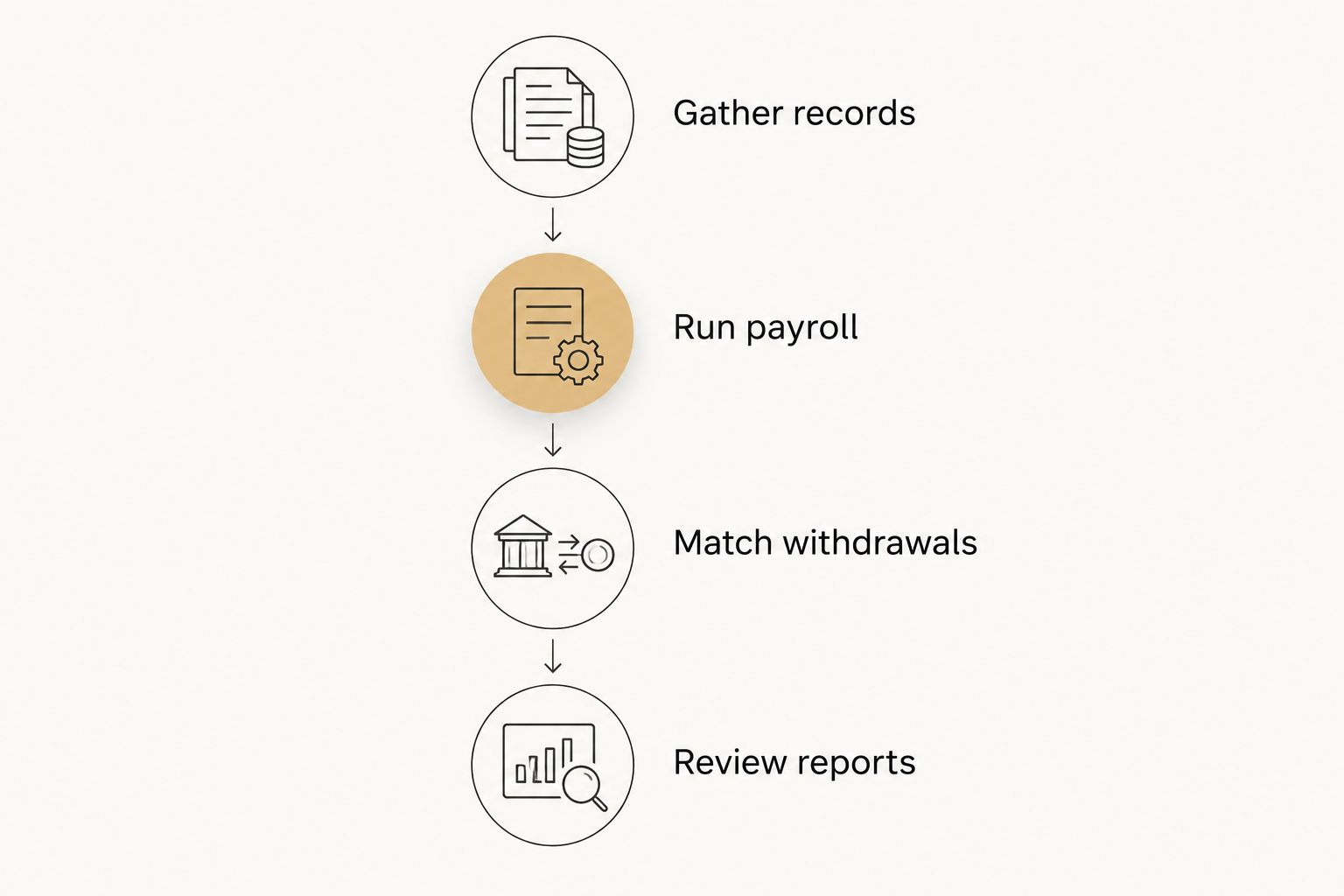
A demonstration passes when you can name the person responsible for each handoff and explain how the final records reach your books. A polished screen is not the acceptance test.
DIY payroll or monthly bookkeeping help?
Payroll software and monthly bookkeeping solve related but different problems. In 2026, choose them together without assuming they are the same service.
You can keep payroll administration yourself while hiring someone to maintain the books. You can also keep both tasks yourself if the work stays current and the records remain understandable.
| Arrangement | Best for | Main advantage | Main drawback |
|---|---|---|---|
| Owner handles payroll and books | Owners with a reliable review routine | Direct oversight of both workflows | Both tasks depend on the owner’s available attention |
| Owner approves payroll; bookkeeper maintains books | Owners who want payment control but less bookkeeping work | Separates payroll authorization from accounting follow-through | Requires a clear report-sharing process |
| Separate payroll and bookkeeping providers | Owners seeking distinct responsibilities | Each agreement can define a specific scope | Someone must coordinate corrections and handoffs |
When discussing monthly bookkeeping with Full Plate, ask what changes in your own weekly routine. Request specific responsibilities: which records you supply, which entries the service handles, which questions come back to you, and what you review each month.
Do not assume payroll processing, tax filing, tip-policy advice, or payroll corrections are included in a bookkeeping agreement. Confirm each item before signing.
How these recommendations are ordered
The ranking starts with your existing operating setup, then moves to accounting fit, owner administration, and service expectations. Those are distinct buying paths—not claims that one provider outperforms the others in every category.
For your final 2026 decision, give the most weight to demonstrated time-record handling, tip records, bookkeeping reports, owner control, and written responsibilities. Leave an unresolved requirement unresolved; do not convert a sales assurance into a confirmed feature.
Which payroll software should you choose?
Start with the provider closest to your existing workflow, then require it to pass your restaurant example. Toast users should begin with Toast Payroll; accounting-led QuickBooks users should begin with QuickBooks Payroll.
Compare Gusto when you want a separate, owner-managed platform. Compare RUN Powered by ADP when the service arrangement is central to your decision.
Do not switch immediately before payday without a documented transition plan. Use this guide to switching restaurant payroll services without missing payday to structure the handoff discussion.
FAQ
What’s the best payroll software for restaurants in Florida?
The best starting point depends on your restaurant’s existing workflow. Compare Toast Payroll for an existing Toast setup, QuickBooks Payroll for accounting-led selection, Gusto for owner-managed administration, and RUN Powered by ADP for a service-led evaluation.
Is Toast Payroll better than QuickBooks Payroll for a restaurant?
Neither is the automatic winner for every restaurant. Start with Toast Payroll when the existing Toast workflow drives the decision, or QuickBooks Payroll when the accounting handoff is the priority, then test the same restaurant records.
Can I run restaurant payroll myself?
Yes, you can administer payroll yourself while retaining responsibility for accurate inputs and approval. Use a documented routine for hours, employee changes, tips, payroll review, and bookkeeping records.
Does hiring a restaurant bookkeeper mean payroll is included?
No, a bookkeeping agreement does not establish that payroll processing is included. Confirm who prepares payroll, approves payments, handles corrections, and records the results in your books.
What should payroll software do with restaurant tips?
The workflow should preserve a clear record of reported tips and distinguish tips already paid from amounts paid through payroll. Ask the provider to demonstrate your restaurant’s actual process and identify which policy questions require professional advice.
What should I ask Full Plate before hiring monthly bookkeeping help?
Ask Full Plate to define the monthly bookkeeping scope and the payroll records you must supply. Confirm whether payroll-related entries, account reconciliation, and questions about differences are included rather than assuming them.
Should I change payroll providers at the same time as my bookkeeper?
Not automatically; decide based on the readiness of each handoff. Assign responsibility for employee records, payroll history, approvals, and bookkeeping reports before changing either workflow.
One last thing
Before choosing payroll software in 2026, ask one final question: Who notices if payroll clears the bank but never reaches the books correctly?
Name that person in your process. Software selection is incomplete until someone owns the accounting handoff.