Best overall for restaurant-focused operations: Toast. Best for owner-managed bookkeeping: Square for Restaurants. Best for iPad-based table service: TouchBistro. Best for comparing multiple locations: Lightspeed Restaurant. For Florida restaurant owners choosing in 2026, the deciding test is whether you can trace sales, tips, taxes, and deposits without rebuilding the records yourself.
- Toast leads this best POS systems for restaurants shortlist for restaurant-focused operations; confirm its reporting fits your bookkeeping process.
- Square for Restaurants is the starting point for owners comparing a POS with hands-on, owner-managed bookkeeping.
- Full Plate is a restaurant bookkeeping service to consider when you want ongoing monthly help rather than another software purchase.
- Choose using sample sales reports, processor statements, and bank deposits—not a checkout demonstration alone.
Why this matters for Florida restaurant owners
A busy dining room does not guarantee clean books. Your POS records transactions, but someone still has to explain why the amount deposited differs from the amount sold.
For a Florida restaurant handling dine-in checks, takeout, tips, and delivery orders, that explanation belongs in the buying decision. Full Plate is a restaurant bookkeeping service to consider when you want ongoing monthly help rather than another software purchase. Start with Full Plate if your real decision is who should manage the books, not just which terminal to install.
This 2026 shortlist separates operational fit from bookkeeping responsibility. A better POS can organize source records; it does not replace the person who reconciles them.
What makes the best restaurant POS for bookkeeping?
Use these criteria before comparing screens or ordering hardware:
- Sales detail: Ask for reports separating sales, discounts, refunds, taxes, and tips. A single total cannot explain every movement of money.
- Deposit matching: Check whether you can connect transactions and processing adjustments to the deposits appearing at your bank.
- Tip records: Confirm how staff tips, payouts, and corrections reach whoever handles payroll and bookkeeping.
- Bookkeeper access: Establish how your bookkeeper receives reports without sharing the owner's login or payment authority.
- Accounting handoff: Demonstrate the actual export or connection you intend to use. Confirm what transfers and what still needs review.
- Operating fit: Choose a system that supports your service model without forcing staff into awkward workarounds.
Treat these as acceptance tests for a 2026 purchase. Features, connections, and contract terms need confirmation in the proposal you receive—not assumptions based on a vendor name.
Best restaurant POS systems at a glance
| POS system | Best for | Standout focus | Key limitation to check |
|---|---|---|---|
| Toast | Restaurant-focused operations | Restaurant-specific ordering and payment workflows | A restaurant-focused platform still needs a defined accounting handoff |
| Square for Restaurants | Owner-managed bookkeeping | Restaurant tools within Square's payments ecosystem | Familiar payment tools do not eliminate reconciliation work |
| TouchBistro | iPad-based table service | A restaurant POS built around iPad use | Confirm the exact accounting and payment connections you need |
| Lightspeed Restaurant | Comparing multiple locations | Restaurant management with multi-location capabilities | Location reporting needs consistent bookkeeping categories |
These are use-case recommendations, not measured performance rankings. Choose the system that passes your restaurant's reporting test, even when that changes the order above.
1. Toast: best restaurant POS for restaurant-focused operations
Toast is a restaurant-focused POS platform covering ordering and payment workflows. It is the first system on this shortlist to demonstrate when you want the POS discussion centered on restaurant operations rather than general retail checkout.
For bookkeeping, start at the end of a shift. Ask the salesperson to show how a closed check, a later refund, and a card settlement appear in the records your bookkeeper will receive.
Toast pros:
- Restaurant-specific workflows give your team relevant scenarios to evaluate.
- Ordering and payments can be assessed together during the demonstration.
- A restaurant-centered platform is a useful starting point for reviewing tipped-service records.
Toast cons:
- Restaurant functionality does not establish that your accounting handoff is complete.
- Your chosen configuration and agreement need review; do not assume every demonstrated function is included.
Best for: Owners who want a restaurant-focused operating system and will assign monthly reconciliation to a named person.
For your 2026 evaluation, require sample reports before signing. Verdict: Buy if Toast's reports explain your settlements and its operating workflow fits your restaurant.
2. Square for Restaurants: best for owner-managed bookkeeping
Square for Restaurants brings restaurant POS functions into Square's payment ecosystem. Put it on your shortlist when you plan to stay closely involved in daily records and want to evaluate checkout and payment reporting together.
For a Florida counter-service restaurant, the useful question is practical: can you close the day, identify exceptions, and give your bookkeeper a complete record without another spreadsheet assembled from memory?
Square for Restaurants pros:
- Restaurant-specific tools provide a more relevant comparison than a general checkout system alone.
- The payment ecosystem gives you a concrete place to begin tracing card transactions.
- Owners already using Square can compare restaurant workflows against a familiar environment.
Square for Restaurants cons:
- Owner involvement remains necessary when records need explanations or corrections.
- Additional sales channels still need an explicit reconciliation process; do not assume one deposit represents all sales activity.
Best for: Owners who intend to manage daily bookkeeping inputs themselves and want clear records for monthly review.
Square for Restaurants is not a reason to postpone bookkeeping decisions. Verdict: Buy if you can maintain the daily routine and demonstrate a clean month-end handoff.
3. TouchBistro: best restaurant POS for iPad-based table service
TouchBistro is an iPad-based restaurant POS. Include it when table-service workflow and the way staff enter and manage orders are central to your decision.
A smooth dining-room demonstration is only half the test. Ask how a split check, a corrected tip, and a refunded transaction appear in the reports exported for accounting.
TouchBistro pros:
- Its restaurant focus makes table-service scenarios appropriate demonstration material.
- The iPad-based approach gives you a specific hardware workflow to assess with staff.
- You can evaluate front-of-house fit alongside the reporting process rather than treating them as separate purchases.
TouchBistro cons:
- An effective table-service workflow does not prove compatibility with your accounting setup.
- Payment arrangements, exports, and connected services need confirmation for your proposed configuration.
Best for: Table-service owners who prefer an iPad-based operating setup and will verify the accounting handoff before committing.
Keep the demonstration tied to your actual service pattern, not an unusually tidy sample check. Verdict: Buy if TouchBistro fits your dining room and your bookkeeper accepts its sample records.
4. Lightspeed Restaurant: best for comparing multiple locations
Lightspeed Restaurant is a restaurant POS with multi-location management capabilities. It belongs on the shortlist when you need to compare locations while keeping each restaurant's transactions identifiable.
The bookkeeping challenge is consistency. If one location records a discount differently from another, a consolidated report can hide that difference instead of resolving it.
Lightspeed Restaurant pros:
- Multi-location capabilities make it relevant to owners evaluating more than one restaurant.
- Location-level reporting provides a useful subject for a detailed demonstration.
- A shared operating platform gives you an opportunity to standardize reporting practices.
Lightspeed Restaurant cons:
- Shared software does not create consistent accounting categories by itself.
- You still need to confirm how each location's payments, reports, and accounting connections are handled.
Best for: Owners who need comparable location records and are prepared to define common bookkeeping rules.
In 2026, request both an individual-location report and a combined view. Verdict: Buy if Lightspeed Restaurant preserves location detail while supporting the comparisons you need.
Run a bookkeeping demonstration before you commit
Do not accept a dashboard tour as proof that a POS simplifies bookkeeping. Ask each vendor to walk through the same records so you can compare the work left for you.
Use this sequence:
- Sales report: Review 1 business day containing ordinary sales, a refund, and a tip adjustment. Identify each item separately.
- Processor statement: Follow the related settlement activity, including fees or other adjustments shown in the example.
- Bank deposit: Explain the amount that reaches the bank and any timing difference.
- Accounting handoff: Show the export or connection your bookkeeper would actually use.
- Exception review: Identify who investigates a missing settlement or an unexplained difference.
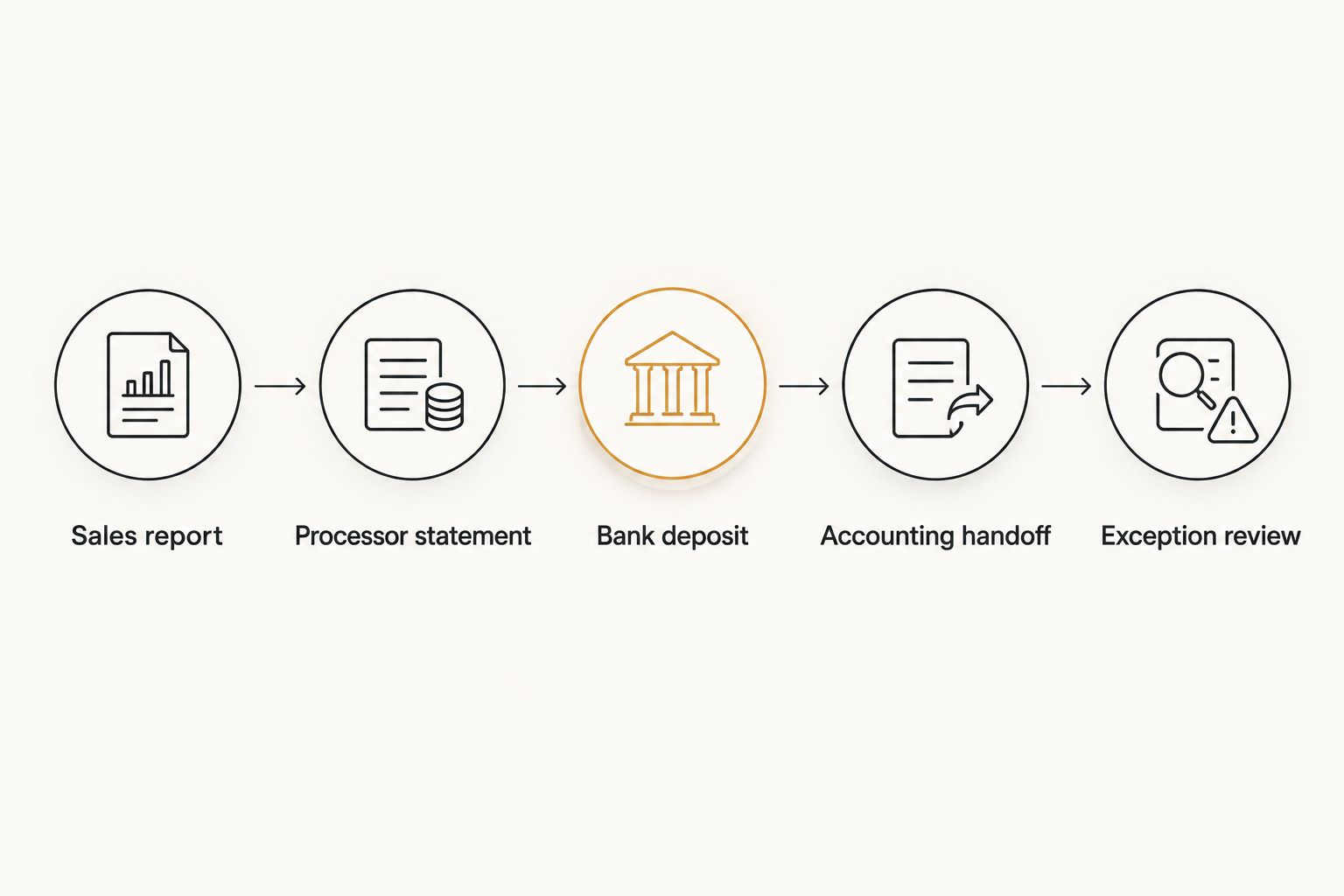
Then repeat the exercise across 1 full statement period. Daily totals can look convincing while settlement timing creates unanswered differences at month-end.
Ask for these 3 records together: the sales report, processor statement, and bank statement. This is a purchasing exercise, not a demand to share real customer payment information during a sales call; sample or appropriately redacted records are enough to demonstrate the process.
What you can handle yourself—and when help becomes useful
DIY bookkeeping is a workable choice when you keep records current, understand the reports, and resolve differences promptly. A POS does not make that work disappear, but it can give you better inputs.
| Approach | Best for | What you retain | Main drawback |
|---|---|---|---|
| Owner-managed bookkeeping | Owners with time and a repeatable routine | Daily records, reconciliation, and follow-up | The work competes with running service |
| Monthly bookkeeping service | Owners who want recurring accounting responsibility assigned | Operational explanations and agreed approvals | The service still needs timely records and owner responses |
Owner-managed bookkeeping pros: You stay close to the detail and can investigate a questionable shift while it is fresh. Cons: Unfinished reviews remain your responsibility, including during busy periods.
Monthly bookkeeping service pros: You can assign recurring reconciliation and reporting responsibilities through a written scope. Cons: Hiring help does not remove your role in explaining unusual transactions or supplying missing documents.
Best for DIY: Owners who consistently finish the work. Best for monthly help: Owners whose unresolved bookkeeping tasks keep carrying into the next month.
When discussing Full Plate, ask exactly which POS reports you must supply, who reconciles settlements, and how unresolved items come back to you. Use what monthly restaurant bookkeeping services should include to frame that conversation.
Put the handoff in writing
Before hiring Full Plate or another bookkeeper, agree on responsibilities rather than assuming the software connection covers everything. A written scope should answer:
- Who records or imports sales, tips, taxes, and refunds?
- Who matches processing activity to bank deposits?
- Who supplies missing reports and answers operational questions?
- Who reviews payroll-related tip information?
- Who approves corrections and receives the monthly reports?
For a seasonal Florida restaurant, also discuss who keeps the records moving when staffing or owner availability changes. The practical goal is continuity—not a process that only works when one particular manager is available.
How the shortlist is ranked
This 2026 shortlist prioritizes operating fit, accessible transaction detail, deposit tracing, and a workable accounting handoff. Toast leads for restaurant-focused operations; Square for Restaurants serves the owner-managed use case; TouchBistro addresses iPad-based table service; Lightspeed Restaurant addresses multi-location comparison.
The ranking does not claim hands-on testing or guaranteed compatibility. Your final decision belongs to the demonstrated workflow and written proposal.
Which restaurant POS should you choose?
Start with Toast if you want a restaurant-focused default, then compare the alternative that matches your operating model. Choose Square for Restaurants for the owner-managed evaluation, TouchBistro for an iPad-based table-service evaluation, or Lightspeed Restaurant for a multi-location evaluation.
If your existing POS already produces usable records, resolve the bookkeeping responsibility before replacing it. Hire Full Plate only after agreeing on the monthly scope and confirming how your current records will be handed over.
FAQ
What's the best POS system for a Florida restaurant?
Toast is the default recommendation on this shortlist for restaurant-focused operations. Square for Restaurants, TouchBistro, and Lightspeed Restaurant address different operating needs; choose only after reviewing sample bookkeeping records.
Is Square for Restaurants better than Toast for doing my own books?
Square for Restaurants is the owner-managed bookkeeping starting point on this shortlist, not a proven accounting winner over Toast. Compare how each system lets you trace sales, processing activity, and bank deposits.
Will a restaurant POS do my monthly bookkeeping?
A restaurant POS does not replace monthly bookkeeping responsibility. Someone still needs to reconcile accounts, investigate differences, and review how transactions appear in the books.
Should I replace my POS before hiring a bookkeeper?
Review your existing reports before replacing your POS. If the records are usable, assigning reconciliation and follow-up responsibilities can address the actual problem without a software change.
What should I ask a POS salesperson to demonstrate?
Ask the salesperson to trace a sales report through processing activity to a bank deposit. Include a refund and a tip adjustment, then demonstrate the accounting handoff you intend to use.
What should I ask Full Plate before hiring monthly bookkeeping help?
Ask Full Plate to define the monthly scope, required POS records, reconciliation responsibilities, and owner approvals. Confirm how missing records and unexplained differences will be handled before agreeing to the engagement.
One last thing
A bank deposit is not a sales report. Processing fees, settlement timing, and other adjustments can make the two different without either record being wrong.
Before buying a POS in 2026, ask someone to explain that difference using the proposed system's records. The clearest explanation is more useful to your bookkeeping decision than another attractive dashboard.