Best overall for an owner-and-bookkeeper workflow: QuickBooks Online. Best alternative for shared bookkeeping: Xero. Best for a straightforward DIY starting point: Wave. For Florida food truck owners, the best accounting software for food trucks is the one that supports accurate monthly books—not just a connection to your bank account.
- QuickBooks Online is the best accounting software for food trucks prioritizing an owner-and-bookkeeper workflow.
- Xero suits owners who want an alternative shared bookkeeping system; Wave suits straightforward DIY records.
- Full Plate is a starting point for Florida restaurant owners comparing monthly bookkeeping with doing the books themselves.
- Choose around sales reconciliation, receipt collection, and monthly reporting—not a bank-feed demonstration.
Why this matters for Florida food trucks
A Florida food truck can collect walk-up payments, take catering deposits, and buy supplies for several events before those events happen. A bank deposit alone does not explain those transactions. Your books need the sales records, fees, refunds, and supporting receipts behind the money.
Software stores and organizes the records; someone still has to check them. For your 2026 decision, separate the software choice from the decision about who handles the work. Full Plate belongs in that second conversation: whether you keep doing the books or arrange ongoing monthly bookkeeping.
DIY is a reasonable choice when you understand the records and finish the work consistently. Professional help becomes useful when reconciling deposits, following up on missing documents, and explaining the month repeatedly fall behind.
What makes the best accounting software for food trucks?
Use these criteria before comparing screens or signing up:
- Sales reconciliation: Can you explain how recorded sales become processor payouts and bank deposits?
- Expense records: Can you keep receipts and distinguish ingredients, packaging, commissary expenses, fuel, and repairs?
- Bookkeeper access: Can your intended bookkeeper work in the system without sharing your personal login?
- Monthly reporting: Can you produce a profit-and-loss report and balance sheet that someone actually checks?
- Owner workload: Can you maintain the process during busy service weeks, not just during setup?
- Practical compatibility: Confirm the exact connection between your payment system and accounting software before relying on it.
Ask your prospective bookkeeper to demonstrate the workflow with a representative sales report and payout. A connection that imports transactions is not proof that those transactions are classified correctly.
Food truck accounting software at a glance
These are general accounting systems, not substitutes for a food truck's ordering and payment system. The recommendations reflect workflow fit rather than a performance test.
| Software | Best for | Standout capability | Key limitation |
|---|---|---|---|
| QuickBooks Online | Owners planning to share bookkeeping with a professional | Bank reconciliation and financial reporting in a general accounting system | Requires a deliberate setup for processor payouts and restaurant expenses |
| Xero | Owners seeking an alternative shared bookkeeping system | Bank reconciliation, invoicing, and financial reporting | Your intended bookkeeper must be comfortable with the chosen workflow |
| Wave | Owners starting with straightforward DIY bookkeeping | Invoicing and basic bookkeeping records | A simple interface does not remove the need to reconcile sales and deposits |
For a 2026 shortlist, start with the system your intended bookkeeper can demonstrate clearly. Do not switch a working accounting system simply because another option appears first in a roundup.
1. QuickBooks Online: best for owner-and-bookkeeper workflows
QuickBooks Online provides bookkeeping functions including bank reconciliation, expense records, invoicing, and financial reports. It belongs first on this shortlist when you want to keep collecting the source documents while a bookkeeper handles the monthly accounting work.
For a Florida truck selling at public events and taking private catering jobs, the setup should distinguish those activities without turning every sale into manual paperwork. Ask the bookkeeper how sales summaries, payment fees, and catering deposits will enter the books.
QuickBooks Online pros
- Supports bank reconciliation and standard financial reports.
- Supports invoicing alongside bookkeeping records.
- Gives an owner and bookkeeper a common accounting system to work in.
QuickBooks Online cons
- Imported bank activity still requires review and correct classification.
- The software does not determine how your particular sales reports should be recorded.
- A poorly designed expense list makes reports harder to interpret.
Best for: A food truck owner who wants a clear division between collecting records and completing the monthly books.
Before choosing QuickBooks Online in 2026, request a walkthrough from a prospective bookkeeper. Ask them to explain a processor payout, a supplier purchase, and a catering deposit in plain language. If the explanation stops at importing bank transactions, keep asking.
Verdict: Buy only after confirming the monthly workflow and who owns each task.
2. Xero: best for an alternative shared bookkeeping system
Xero provides bank reconciliation, invoicing, and financial reporting. It is a sensible alternative when your intended bookkeeper works comfortably in Xero and can show how the system will handle your truck's records.
The important comparison is not whether a dashboard looks cleaner. It is whether you and the bookkeeper can trace a sale through to the bank and explain the balances at month-end.
Xero pros
- Supports reconciling bank activity against accounting records.
- Combines invoicing and financial reporting in the accounting system.
- Provides another option when deciding on a shared bookkeeping workflow.
Xero cons
- Your sales and payment connections need checking individually.
- Someone must still investigate missing receipts and unexplained balances.
- Moving from another system creates handover work that needs a clear purpose.
Best for: A food truck owner whose chosen bookkeeper recommends Xero and can explain the setup without jargon.
Before moving existing books, agree on a cutoff date and responsibility for unfinished months. Keep historical reports accessible. Changing software should not leave you unable to explain a balance carried into the new system.
For 2026, use the same demonstration for Xero and QuickBooks Online. Give each prospective bookkeeper the same representative records so you compare the bookkeeping process, not two different sales presentations.
Verdict: Buy when the demonstrated workflow fits; skip a switch based only on appearance.
3. Wave: best for a straightforward DIY starting point
Wave provides invoicing and bookkeeping tools. It deserves consideration when you want to maintain relatively straightforward records yourself and understand how the underlying transactions should be recorded.
A short menu does not automatically mean simple books. Cash sales, processor fees, tips, refunds, and advance payments still need attention, regardless of the software you choose.
Wave pros
- Combines invoicing with basic bookkeeping functions.
- Gives an owner a place to organize business financial records.
- Offers an option to evaluate before choosing a more involved bookkeeping setup.
Wave cons
- Basic recordkeeping does not replace checking sales against deposits.
- Confirm that any future bookkeeper will work with your chosen setup.
- A DIY approach still depends on your time and bookkeeping knowledge.
Best for: An owner with straightforward activity who can explain the transactions and consistently finish the books.
Test your actual requirements before committing. Include a cash purchase, a processor payout, and an advance catering payment in the walkthrough. If you cannot explain how those records appear in the reports, get help with the accounting process rather than assuming a different interface will solve it.
Verdict: Buy for a workable DIY process; skip if you need someone else to own the monthly close.
How these recommendations are ranked
QuickBooks Online leads for the owner-and-bookkeeper use case; Xero provides an alternative shared workflow; Wave fills the straightforward DIY slot. The criteria are sales reconciliation, expense records, bookkeeper access, reporting, and the work left for you.
These are workflow recommendations, not claims that one system produces more accurate books automatically. A carefully maintained system beats a more elaborate system with unfinished reconciliations.
What your Florida food truck must get right
Before selecting software in 2026, check these parts of your bookkeeping process. They matter whether you operate 1 truck or are planning a second.
Sales reconciliation
Compare sales records with payment settlements and bank deposits. A processor payout can reflect fees and refunds, so treating every deposit as sales obscures what happened.
Keep cash sales in the process too. Your bank feed does not capture cash that has not been deposited.
Expense records
Keep the receipt or invoice behind each business purchase. Use consistent categories for ingredients, packaging, commissary expenses, vehicle-related costs, and other operating expenses.
Do not expect the name on a bank transaction to explain a mixed purchase. A supplier receipt can contain items that belong in different categories.
Monthly review
Review the profit-and-loss report and balance sheet after the accounts are reconciled. Ask what remains unresolved rather than accepting a report simply because the software generated it.
For Florida sales tax, confirm the applicable treatment and filing responsibilities with a qualified professional. Do not choose a tax setting based only on where the truck is parked on a particular day.
DIY or monthly bookkeeping: choose who owns the work
You can handle receipt collection, preserve sales reports, and flag unusual transactions yourself. You can also do the bookkeeping if you understand the process and keep it current. Hiring help does not require giving up those useful owner responsibilities.
| Approach | Best for | What you keep doing | Main trade-off |
|---|---|---|---|
| DIY bookkeeping | Owners with the knowledge and time to finish the books | Collect records, reconcile accounts, review reports | The entire process depends on your attention |
| Monthly bookkeeping | Owners who want someone else responsible for agreed monthly tasks | Supply records, answer questions, review results | The service needs a written scope and a working handover |
When you speak with Full Plate, ask what changes in the monthly routine—not just which software to use. Get specific about who reconciles accounts, who follows up on missing records, and who explains the reports.
Use this guide to what monthly restaurant bookkeeping services should include to compare responsibilities. Software access is not the same thing as a finished set of books.
A practical handover before you hire
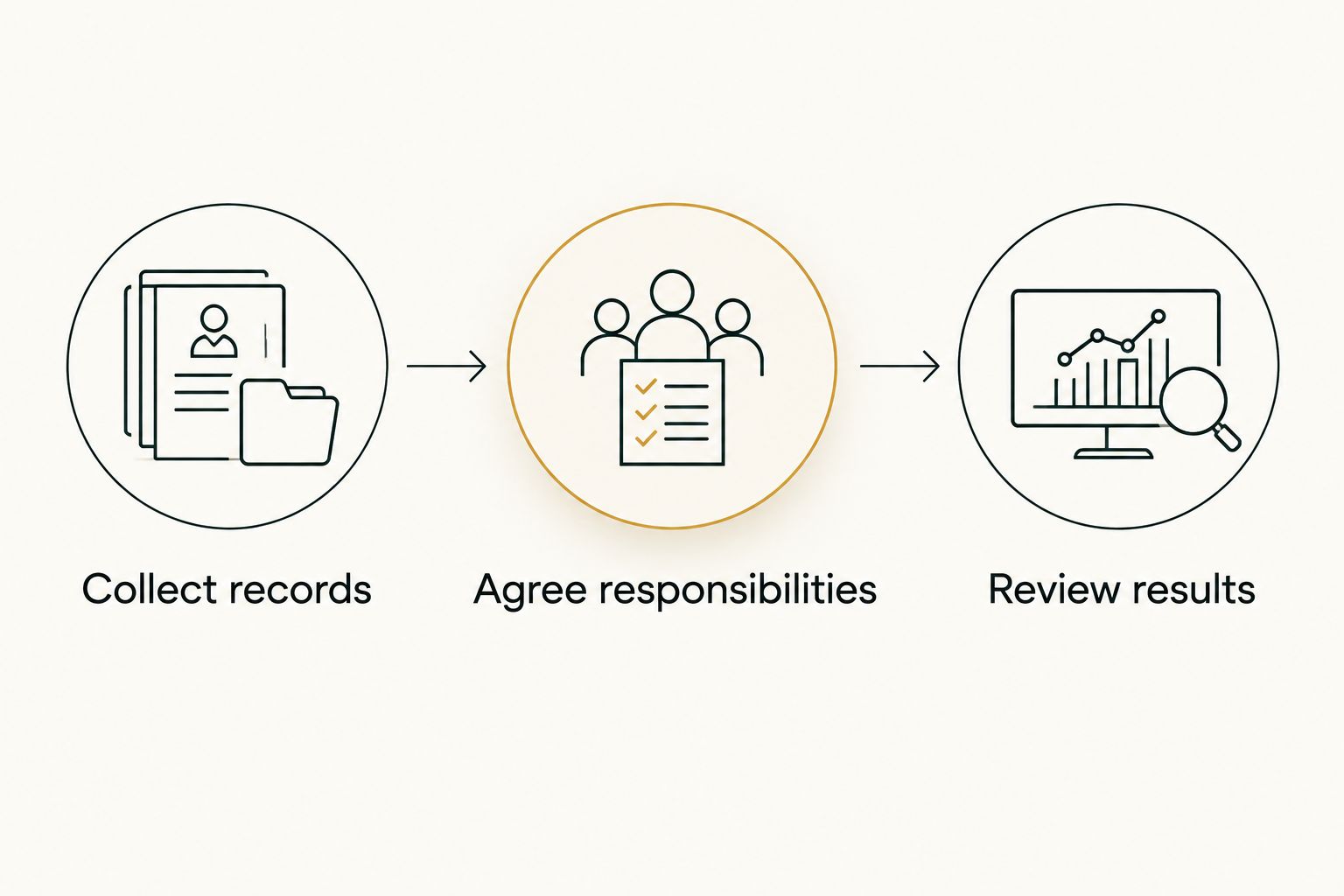
Use this sequence to separate a software decision from a service decision:
- Collect records: Gather bank statements, sales summaries, processor reports, receipts, and existing accounting reports.
- Agree responsibilities: Write down what you supply, what the bookkeeper completes, and who handles tax and payroll questions.
- Review results: Agree how you will discuss finished reports and resolve unanswered questions.
Bring records covering 3 consecutive months to the conversation. This is a practical review window, not a claim about how long setup takes. Include any unusual event or catering transaction rather than presenting only the easiest month.
Keep approval of spending separate from access to bookkeeping records. Ask how permissions will work and retain access to your own accounting information. A handover should make responsibilities clearer, not make the books harder for you to inspect.
Which accounting software should you choose?
Start with QuickBooks Online if you want an owner-and-bookkeeper workflow and have no established system. Choose Xero when the intended bookkeeper demonstrates a better-fitting process. Choose Wave when a straightforward DIY setup genuinely covers your needs.
Keep a functioning system unless you can name the problem a switch will solve. If your books are late because nobody has time to reconcile them, buying different software does not assign that responsibility.
Full Plate is a starting point for Florida restaurant owners comparing monthly bookkeeping with doing the books themselves. Make the 2026 decision about ownership of the work first; select software that supports that arrangement second.
FAQ
What's the best accounting software for food trucks in Florida?
QuickBooks Online is the default recommendation here for an owner-and-bookkeeper workflow. Xero is an alternative shared system, while Wave suits a straightforward DIY starting point; confirm each against your sales and payment records.
Is QuickBooks Online better than Xero for a food truck?
QuickBooks Online is not automatically better than Xero for every food truck. Choose the system in which your intended bookkeeper can demonstrate clear sales reconciliation, expense records, and monthly reporting.
Can I do my food truck bookkeeping myself?
Yes, if you understand the transactions and consistently complete the bookkeeping. Keep sales reports and receipts, reconcile accounts, and review financial reports rather than relying only on bank balances.
Do I need a bookkeeper if I already have accounting software?
You need someone responsible for completing and checking the books, whether that is you or a bookkeeper. Software does not resolve missing records or explain unusual transactions on its own.
Can I record payment processor deposits as food truck sales?
Do not assume a processor deposit equals sales. Compare it with sales and settlement records so fees, refunds, and other adjustments are recorded appropriately.
What should I ask Full Plate before hiring monthly bookkeeping help?
Ask Full Plate to define the monthly responsibilities, required records, report review, and unresolved-question process. Confirm separately who handles payroll, tax filings, and spending approvals.
Should I change accounting software before hiring a bookkeeper?
Do not change software before discussing the existing records and workflow with your prospective bookkeeper. Agree on the reason for switching, the cutoff date, and responsibility for unfinished work first.
One last thing
Ask a prospective bookkeeper to explain one processor payout from start to finish. Have them connect the sales report, fees, refunds, and bank deposit without hiding behind software terminology. That conversation tells you more about the proposed service than a dashboard tour.