Best overall: QuickBooks Online for a general-purpose restaurant ledger. Best for connected restaurant operations: Restaurant365; best for accountant-led collaboration: Xero; best for a straightforward owner-managed ledger: Wave. This 2026 guide compares software choices for independent Florida restaurants and explains when monthly bookkeeping is the better next step.
- QuickBooks Online is the best accounting software for restaurants needing a general-purpose ledger, not an entire operations system.
- Restaurant365 fits owners who want restaurant accounting connected with inventory and operating workflows.
- Xero suits accountant-led bookkeeping; Wave suits straightforward owner-managed records.
- Full Plate belongs on the shortlist for Florida owners considering monthly restaurant bookkeeping instead of handling everything themselves.
Why this matters for Florida restaurant owners
A restaurant needs more than a place to categorize bank transactions. Card deposits, delivery-platform settlements, tips, supplier bills, and payroll all need records that explain what happened.
Your Florida restaurant also needs a clear division between bookkeeping, payroll work, and tax filing. A software subscription does not establish that division. Neither does hiring someone without agreeing on the scope.
If your main decision is whether to keep doing the books yourself, consider Full Plate alongside the software decision. Full Plate restaurant bookkeeping belongs on the shortlist for Florida owners seeking ongoing monthly help rather than another task to manage. Ask which responsibilities would stay with you and which would transfer.
What makes the best accounting software for restaurants?
Judge the software against work your restaurant actually needs completed:
- Deposit reconciliation: You need to connect recorded sales, processor deductions, and deposits without treating every deposit as sales revenue.
- Useful reporting: Your profit-and-loss report should separate meaningful restaurant expenses, including food purchases, labor, and payment processing.
- Compatible connections: Confirm support for your exact point-of-sale system, payroll arrangement, and delivery reporting process.
- Monthly close: Someone must review balances, resolve questions, and finish the reporting period.
- Owner workload: Choose a system you or your bookkeeper can maintain consistently, not one with the longest feature list.
For your 2026 shortlist, request a demonstration using a restaurant settlement statement and a supplier bill. A clean example reveals more than a tour of dashboard charts.
Restaurant accounting software at a glance
| Software | Best for | Standout feature | Key limitation |
|---|---|---|---|
| QuickBooks Online | General-purpose restaurant bookkeeping | Bank reconciliation and financial reporting | Restaurant operating workflows need separate evaluation |
| Restaurant365 | Connected restaurant operations | Restaurant-focused accounting, inventory, and operations tools | Broader setup and operating processes require attention |
| Xero | Accountant-led collaboration | Shared access to a general accounting ledger | Restaurant-specific workflows need separate evaluation |
| Wave | Straightforward owner-managed records | Invoicing, transaction records, and basic accounting reports | Not a dedicated restaurant operations system |
These are different software choices, not interchangeable restaurant management systems. Confirm current features and connection requirements before committing; a familiar product name does not prove that your particular workflow fits.
1. QuickBooks Online: best for a general restaurant ledger
QuickBooks Online handles general business accounting, including transaction recording, bank reconciliation, and financial reports. It fits a restaurant that wants an accounting foundation without replacing every operating system.
The important question is how sales reach the ledger. A bank feed records money moving through the bank; it does not independently explain the difference between gross sales, taxes, tips, fees, and the resulting deposit.
QuickBooks Online pros:
- Provides a general ledger and standard financial reporting.
- Supports bank reconciliation rather than relying only on transaction categories.
- Lets the restaurant separate accounting from its choice of operating tools.
QuickBooks Online cons:
- Restaurant-specific sales mapping still needs design and review.
- Inventory, recipe costing, and scheduling require a separate fit check rather than an assumption.
Best for: An independent Florida restaurant that wants general accounting software maintained by an owner or bookkeeper.
For a 2026 evaluation, ask the person who will maintain QuickBooks Online to explain how a delivery-platform settlement enters the books. The explanation should identify the supporting records and show how the final deposit gets matched.
Verdict: Buy QuickBooks Online when you need a general ledger and have a clear plan for maintaining it.
2. Restaurant365: best for connected restaurant operations
Restaurant365 combines restaurant-focused accounting with tools for inventory and operating management. Its distinction is scope: it addresses restaurant workflows beyond the bookkeeping ledger.
That scope matters when your problem includes purchasing, inventory information, and location-level reporting. It matters less when your immediate problem is simply that nobody finishes the books each month.
Restaurant365 pros:
- Organizes accounting around restaurant operations.
- Includes inventory-related tools alongside accounting functions.
- Provides a restaurant-focused option for evaluating connected operating workflows.
Restaurant365 cons:
- A broader system requires decisions about setup, responsibilities, and ongoing data entry.
- Software alone does not fix missing purchasing records or inconsistent operating procedures.
Best for: A restaurant owner whose accounting decision is also an inventory and operating-process decision.
Ask for a demonstration that follows a supplier invoice through the relevant accounting and inventory workflow. Then identify who on your team would complete each step. A feature is useful only if the underlying information gets entered and checked.
Verdict: Buy Restaurant365 when connected restaurant operations are part of the requirement; skip it as a substitute for assigning bookkeeping responsibility.
3. Xero: best for accountant-led collaboration
Xero provides general accounting tools, including bank reconciliation, bills, and financial reports. It is a sensible option to evaluate when your chosen accounting professional already has a clear workflow for maintaining your restaurant's records in Xero.
Start with the bookkeeping process, not the dashboard. Ask how sales summaries, payroll entries, supplier bills, and bank balances will come together at month-end.
Xero pros:
- Supports a shared accounting workflow between owner and accounting professional.
- Includes reconciliation and standard financial reporting.
- Keeps the general ledger separate from restaurant operating-system choices.
Xero cons:
- Restaurant-specific sales and payment workflows still need setup.
- A change of accounting platform creates transition work that needs an owner.
Best for: A Florida restaurant choosing its accounting platform together with the professional who will maintain it.
If your current software works, do not switch solely because a different dashboard looks cleaner. Ask what specific bookkeeping problem the move would solve and how opening balances would be checked.
Verdict: Buy Xero when the person responsible for your monthly books can explain the complete restaurant workflow.
4. Wave: best for straightforward owner-managed records
Wave offers accounting tools for recording transactions and producing basic financial reports. It deserves consideration when you intend to maintain a straightforward ledger yourself and do not need a restaurant operating platform.
Evaluate the work around the software as carefully as the software itself. Your restaurant still needs source documents, reconciled balances, and a reliable way to explain deposits.
Wave pros:
- Provides a general accounting option for owner-managed records.
- Supports transaction records and basic financial reporting.
- Keeps the evaluation focused on bookkeeping rather than restaurant operations features.
Wave cons:
- It is not a dedicated restaurant inventory or operating system.
- Your exact sales, payroll, and delivery-platform workflow needs verification before you choose it.
Best for: An owner comfortable maintaining the books and checking whether each required workflow fits.
For your 2026 decision, test Wave against a real month of restaurant activity rather than a few sample expenses. Include deposits, supplier bills, payroll records, and any delivery settlements your restaurant receives.
Verdict: Buy Wave only after confirming that the full monthly workflow fits; skip it if the choice leaves essential records disconnected.
DIY or monthly bookkeeping: choose the responsibility first
Doing your own books is a valid choice when you understand the records and can keep them current. Hiring help becomes useful when unresolved transactions accumulate, reconciliations remain unfinished, or you cannot explain the reports you use to make decisions.
| Approach | Best for | Main advantage | Main limitation |
|---|---|---|---|
| DIY bookkeeping | Owners who can maintain and review their records | Direct control and familiarity with transactions | The owner remains responsible for completing the work |
| Monthly bookkeeping service | Owners who want an agreed recurring process | Defined responsibility for the work included in scope | The owner still needs to supply records and answer questions |
For a Florida restaurant, write down who handles sales-tax records, tip information, and payroll entries. Do not assume monthly bookkeeping includes preparing every return or running payroll.
When discussing Full Plate restaurant bookkeeping, ask for that division in writing. The useful change is a defined handoff: what you submit, what gets reviewed, what reports you receive, and what still needs your approval. Confirm the actual service scope before deciding.
Check the monthly workflow before you sign
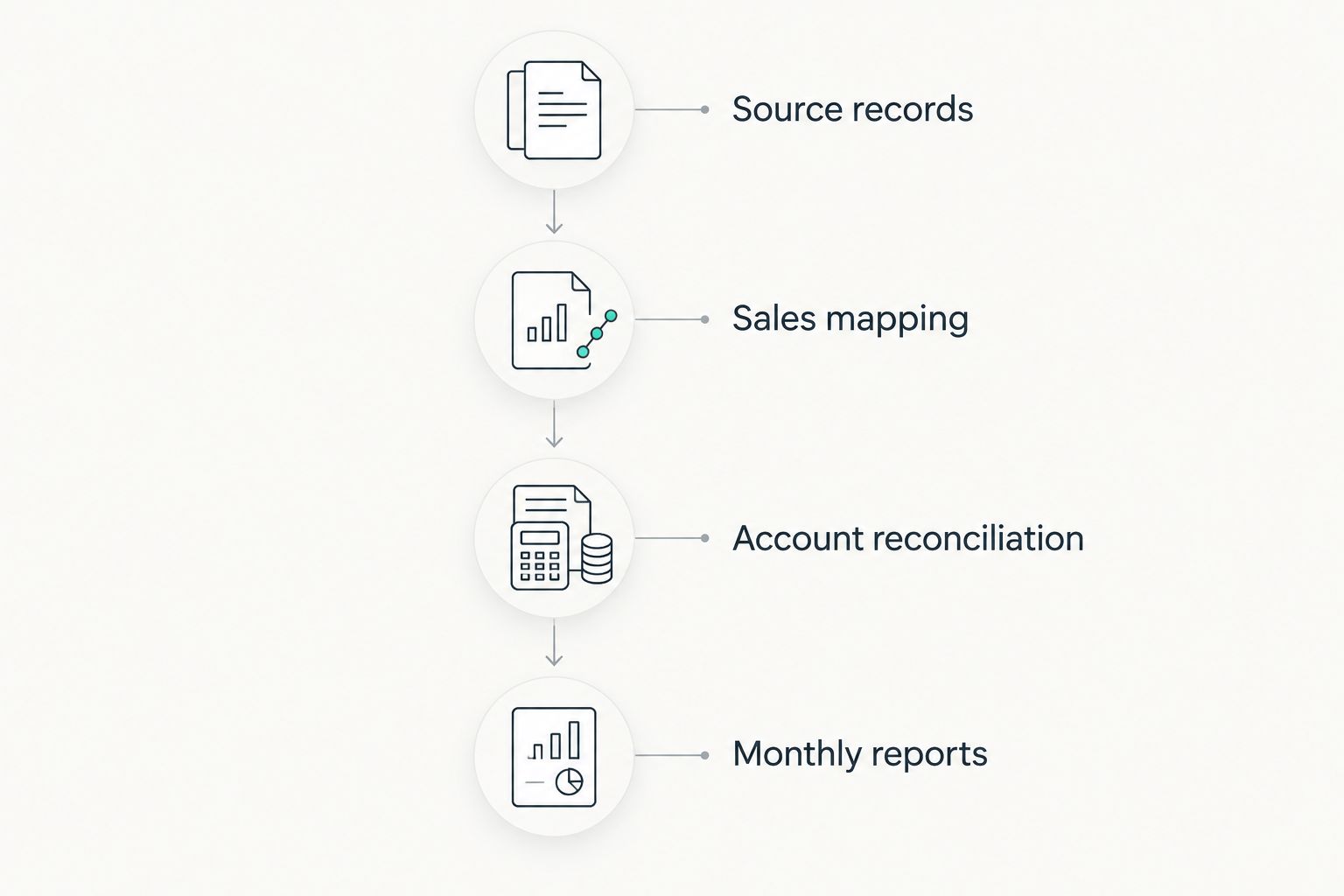
Use this sequence to evaluate either a software setup or a bookkeeping proposal. It turns a broad promise about organized books into a process you can inspect.
Source records
Identify the records needed from your point-of-sale system, payment processor, bank, payroll provider, and suppliers. For an initial review, gather 30 days of activity so the discussion covers actual restaurant transactions.
Sales mapping
Ask how the records separate sales, taxes, tips, refunds, and processing fees. Have the provider explain any differences between recorded sales and deposited funds.
Account reconciliation
Require a clear process for matching ledger balances to statements. Include 3 account types in the discussion: bank accounts, credit cards, and loans, wherever your restaurant uses them.
Monthly reports
Agree on the reports, the review process, and how unanswered questions get resolved. If your restaurant has seasonal patterns, request a comparison covering 12 months when those records exist.
A monthly bookkeeping arrangement needs both sides to participate. You provide complete records and business explanations; the written agreement establishes the provider's work and the reporting handoff.
Discuss your monthly bookkeeping
Ask Full Plate about responsibilities, required records, and the scope of ongoing restaurant bookkeeping.
How these options are ranked
The 2026 ranking separates four needs: a general ledger, connected restaurant operations, accountant-led collaboration, and straightforward owner-managed records. The criteria are reconciliation, useful reporting, workflow compatibility, monthly completion, and owner workload.
This is a fit-based recommendation, not a measured performance ranking. The default favors a general accounting foundation; the other choices serve distinct operating requirements.
Which restaurant accounting software should you choose?
Start with QuickBooks Online if you need a general restaurant ledger and have someone responsible for maintaining it. Choose Restaurant365 when operating workflows belong in the same evaluation, Xero when it fits your accounting professional's process, and Wave when your owner-managed workflow checks out.
If the books are unfinished because you lack time, changing software does not assign the work. Evaluate monthly bookkeeping before moving your records to another platform.
FAQ
What's the best accounting software for restaurants in Florida?
QuickBooks Online is the default recommendation here for a general restaurant ledger. Restaurant365 fits a broader restaurant-operations requirement, while Xero and Wave serve different bookkeeping workflows.
Is Restaurant365 better than QuickBooks Online?
Restaurant365 is the better fit when restaurant accounting and operating workflows belong in the same system evaluation. QuickBooks Online fits a general-ledger requirement; choose according to the work you need completed.
Can I do my restaurant bookkeeping myself?
Yes, you can maintain your restaurant's books if you can record activity, reconcile accounts, and review the results consistently. Keep supporting records and resolve differences rather than categorizing deposits without checking them.
Does accounting software handle Florida sales tax for me?
Buying accounting software does not by itself establish who prepares, reviews, and files your Florida sales-tax returns. Confirm the software setup and assign filing responsibility separately.
When should I hire a monthly restaurant bookkeeper?
Consider monthly bookkeeping when reconciliations remain unfinished or bookkeeping repeatedly gets displaced by restaurant work. Ask Full Plate what work is included and what information you must provide.
Should I change software before hiring a bookkeeper?
Evaluate your existing setup before changing software. Ask the prospective bookkeeper whether the current system can support an accurate monthly process and what a switch would solve.
What should I ask in a restaurant bookkeeping consultation?
Ask who handles source records, sales mapping, reconciliation, reports, payroll entries, and tax filings. Request a written scope that separates included work from owner responsibilities.
One last thing
A reconciled bank account does not prove that every sale reached the books correctly. Reconciliation checks the account balance; sales records explain the activity behind it.
Before making your 2026 choice, ask whoever will maintain the books to trace a card settlement from recorded sales to the bank deposit. That single walkthrough makes the software discussion concrete—and shows which work you will keep or hand off.